
Hey everyone! As I’m diving into Active Directory (AD) pentesting, I wanted to share what I’ve learned so far. Active Directory is basically Microsoft’s directory service that manages everything in a Windows network - users, computers, permissions, you name it. Think of it as the brain of a corporate network. When we’re pentesting AD, we’re trying to find weaknesses in how it’s configured and secured, then exploit those to gain higher privileges or access sensitive data.
Introduction to Active Directory Pentesting
Understanding Active Directory Structure
Lets have a small understanding on the AD structure. To attack AD effectively, you need to understand how it’s organized.
- At the top level, there’s a Forest - the security boundary of the entire AD environment. Inside a forest, you have Trees, which are collections of domains sharing a namespace.
- Each Domain is like a mini kingdom with its own users and resources, managed by Domain Controllers (DCs) - these are the servers that handle authentication and store all the AD data.
- Within domains, everything is organized using Organizational Units (OUs) - think of them as folders that help admins organize objects logically (like by department or location).
- Inside OUs, you’ll find Objects: Users (employee accounts), Computers (workstations and servers), Groups (collections of users), and other resources like Printers.
- The Global Catalog is like an index that spans the entire forest, helping systems quickly find objects anywhere in the AD structure.
Forest
│
├── Tree
│ │
│ ├── Domain (Parent)
│ │ │
│ │ ├── OU (Organizational Unit)
│ │ │ │
│ │ │ ├── Objects
│ │ │ │ ├── Users
│ │ │ │ ├── Computers
│ │ │ │ ├── Groups
│ │ │ │ ├── Printers
│ │ │ │ └── Resources
│ │ │
│ │ └── Domain Controller (DC)
│ │
│ └── Child Domain(s)
│ │
│ ├── OU
│ │ └── Objects (Users, Computers, etc.)
│ └── Domain Controller (DC)
│
└── Global Catalog (spans the entire Forest)
Types of Systems in Active Directory Environments
Before we jump into the attack phase, let’s talk about the different types of systems you’ll encounter in an AD environment.
- Domain Controllers (DCs) are the most critical - they authenticate users, enforce security policies, and replicate AD data across the network. Compromising a DC means game over for the organization.
- File Servers store shared documents and data, and they’re often goldmines for sensitive information or misconfigured permissions.
- Application Servers host business-critical apps like web servers, databases (SQL Server), email servers (Exchange), or custom applications - these can have vulnerabilities or store credentials.
- Workstations are the everyday computers users log into, and while they seem less important, they’re often the easiest entry point and can have cached credentials or access to other systems. You’ll also find infrastructure servers like DNS servers, backup servers, and monitoring systems.
Each system type has different attack surfaces and value - DCs are high-value but usually better protected, while workstations and file servers might be easier targets for initial access.
Identifying Active Directory
So how do you actually identify if a machine is part of an AD environment and what role it plays? The answer lies in the ports and services running on these systems. When you scan the network, look for these key indicators:
- Port 88 (Kerberos) is a dead giveaway for AD authentication, and if you see it, you’re definitely dealing with an AD environment.
- Port 389 (LDAP) and 636 (LDAPS) are used for directory queries and are typically open on Domain Controllers.
- Port 445 (SMB) will be open on almost every Windows machine for file sharing, but on a DC it also handles domain authentication traffic.
- Port 53 (DNS) on a Windows server usually indicates a DC, since DCs typically run DNS for the domain.
- Port 3389 (RDP) is common on servers and workstations for remote access. Port 135 (RPC) and dynamic RPC ports are used for remote management and various AD operations.
If you see a machine with ports 88, 389, 636, 53, and 445 all open together, you’ve almost certainly found a Domain Controller. Regular workstations and member servers will typically have 445 and maybe 3389 open, but won’t have the Kerberos or LDAP ports. Understanding these port patterns helps you map out the network and prioritize your targets.
Active Directory Ports and Protocols
Below, I’m listing the common ports used in Active Directory environments
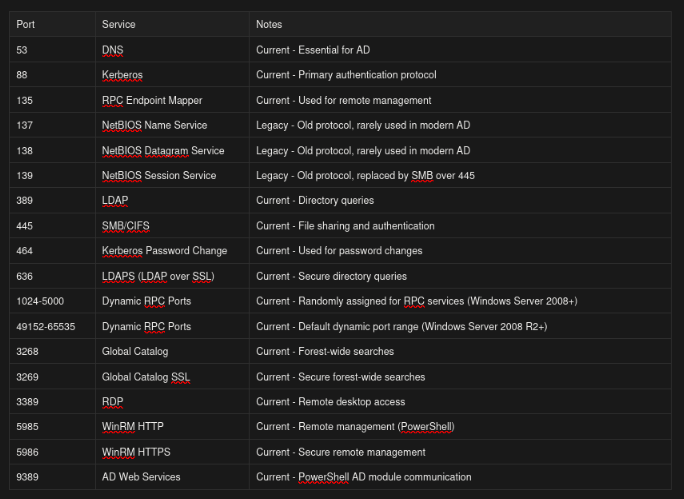
Now that we understand AD ports and services, let’s jump into basic enumeration - remember, in AD pentesting, information is power, so document every single finding because that random share or username you discover today might be your path to domain admin tomorrow.
DNS Enumeration
There are various tools that can be used for DNS enumeration like dig, dnsenum, dnsrecon, nslookup and many more. Use whichever tool you’re comfortable with - I’ll be demonstrating with dig and dnsenum in this blog.
Dig
The dig (Domain Information Groper) command is a powerful DNS lookup tool that helps us query DNS servers for information about a domain. The basic syntax is dig @nameserver domain recordtype. The @nameserver specifies which DNS server to query, domain is the target domain you’re investigating, and recordtype specifies what kind of DNS records you want to retrieve (like A, MX, TXT, NS, SOA, etc.). Instead of querying individual record types, you can use ANY to retrieve all available records at once, which is useful during initial reconnaissance.
dig @server <domain> ANY
You can also query specific record types instead of using ANY - common ones include: A (IP addresses), MX (mail servers), TXT (text records often containing SPF/DKIM), NS (name servers), SOA (zone authority info), CNAME (aliases), PTR (reverse DNS), and SRV (service records).

From this output, we can extract some really valuable information. Notice the NS records showing two name servers: nsztm1.digi.ninja and nsztm2.digi.ninja. When you discover multiple name servers like this, it’s always worth attempting a DNS zone transfer against each of them. A zone transfer (AXFR) is basically asking the DNS server to hand over its entire zone file - if misconfigured, this gives you a complete map of all subdomains, hosts, and IP addresses in the domain, which is a goldmine for reconnaissance.
Zone Transfer
dig AXFR @server <domain>
A DNS zone transfer (AXFR) is essentially asking a DNS server to hand over its entire zone file containing all DNS records for a domain. Normally, this should only work between authorized DNS servers for replication purposes, but if misconfigured, anyone can request it. In Active Directory pentesting, this is incredibly valuable because AD heavily relies on DNS - a successful zone transfer gives you a complete map of the domain without any active scanning. You’ll discover all hostnames, IP addresses, subdomains, service locations, and even sometimes sensitive information left in TXT records. It’s like getting the building blueprints before attempting a break-in.
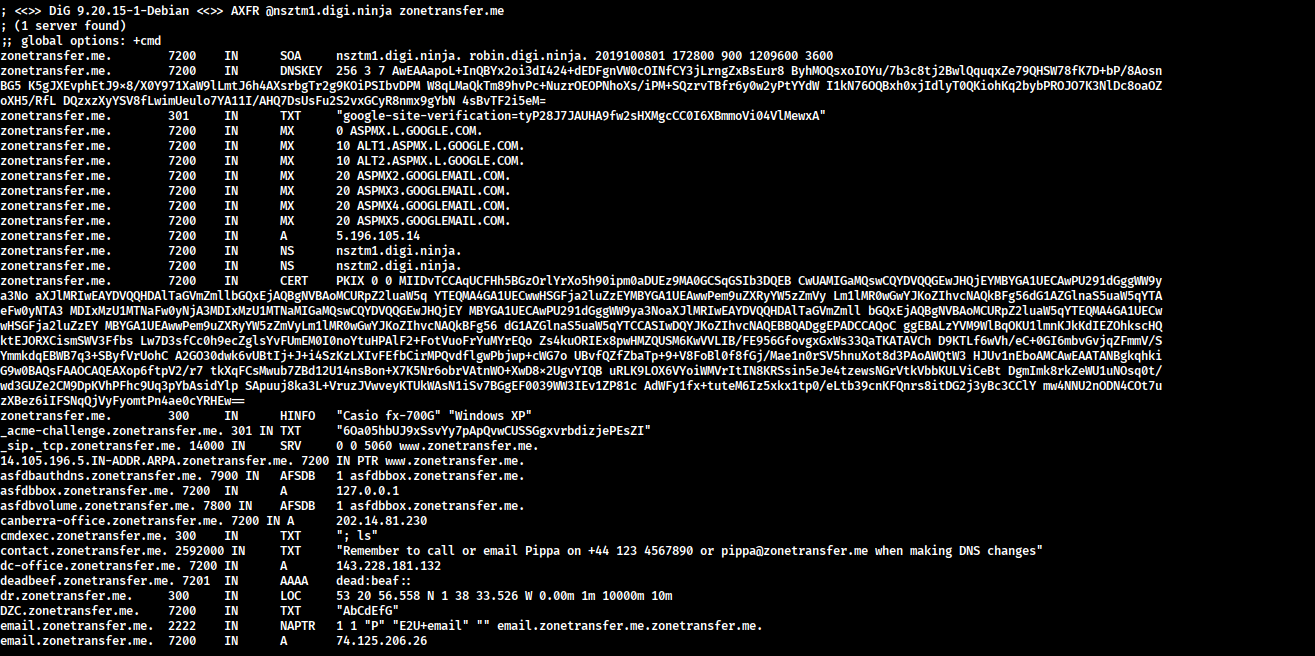
From this zone transfer, we discovered several valuable targets: office locations (canberra-office, dc-office, office) which reveal the network’s geographic spread and potential domain controller locations based on naming conventions, critical services like vpn.zonetransfer.me (a potential entry point for remote access attacks), owa.zonetransfer.me (Outlook Web Access - perfect for password spraying or phishing campaigns), and staging.zonetransfer.me (staging environments are often less secured), an internal subdomain (internal.zonetransfer.me) with its own nameservers suggesting a separate internal network to investigate, service records showing SIP/VoIP infrastructure that could be exploited, and most importantly sensitive information leakage in the contact TXT record revealing an employee name (Pippa), phone number, and email address - perfect ammunition for social engineering attacks. This single command gave us a complete network reconnaissance without triggering any intrusion detection systems, providing multiple attack vectors to explore in the next phase of testing.
SRV record discovery
SRV (Service) records are like a phonebook for services in Active Directory - they tell clients where to find specific services and on which ports they’re running. In AD pentesting, SRV records are absolute gold because they directly point you to Domain Controllers, Global Catalog servers, Kerberos services, and other critical infrastructure. Unlike guessing which servers are DCs based on naming conventions, SRV records give you definitive answers. By querying these records, you can map out the entire AD infrastructure, identify all domain controllers, discover site topology, and understand the domain hierarchy - all without sending a single packet to the actual servers.
<service>.<protocol>.<subdomain-or-zone>
# e.g.
_ldap._tcp.dc._msdcs.example.local
_service._udp.subdomain.example.com
*# Query for Domain Controllers
dig _ldap._tcp.dc._msdcs.example.local SRV
# Query for Kerberos services
dig _kerberos._tcp.example.local SRV
# Query for Global Catalog servers
dig _gc._tcp.example.local SRV*
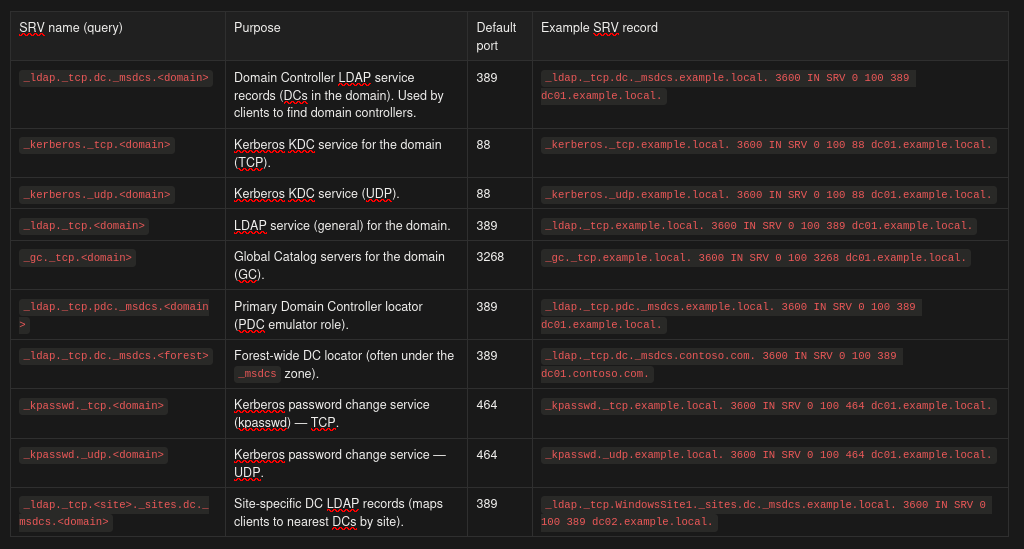
_service._protocol.domain. TTL IN SRV priority weight port target.
- Priority: Lower values mean higher priority (0 is highest)
- Weight: Load balancing between servers with same priority
- Port: The port number the service is listening on
- Target: The actual hostname of the server providing the service
Let’s say you query _ldap._tcp.dc._msdcs.corp.local and get back three SRV records pointing to dc01.corp.local, dc02.corp.local, and dc03.corp.local - congratulations, you’ve just identified all three domain controllers without scanning the network! Now you know exactly which servers to target for Kerberos attacks, LDAP enumeration, or privilege escalation attempts.
If you query _ldap._tcp.HQ._sites.dc._msdcs.corp.local and discover site-specific records, you’ve mapped out the physical or logical site structure, which helps you understand network segmentation and find potentially less-monitored remote sites. The _gc._tcp records reveal which DCs are also Global Catalog servers - these are extra valuable targets because they contain information about the entire forest, not just a single domain.
Start with _ldap._tcp.dc._msdcs.<domain> - this is the most reliable way to discover all domain controllers. Then query site-specific records to understand the AD topology. Save all discovered hostnames and IPs for the next enumeration phase!
Dnsenum
DNSenum is like the Swiss Army knife of DNS reconnaissance - it automates everything we’ve been doing manually with dig and much more. Instead of running multiple commands to query different record types, attempt zone transfers, and discover subdomains, DNSenum does it all in one shot. It’s especially valuable in AD pentesting because it not only performs zone transfers but also brute-forces subdomains using wordlists, scrapes Google for additional subdomains, performs reverse lookups to map IP ranges, and even does WHOIS lookups to identify netblocks. This comprehensive approach ensures you don’t miss any part of the attack surface.
dnsenum --dnsserver <server> --enum <domain>
What DNSenum Can Do:
DNSenum automates a ton of reconnaissance tasks in a single command:
- Query all standard DNS records (NS, A, AAAA, MX, SOA, TXT)
- Automatically attempt AXFR (zone transfers) against all discovered nameservers
- Perform reverse PTR lookups to find additional hostnames
- Brute-force subdomains using built-in or custom wordlists (
f/--file)
- Google scraping for subdomain discovery (finds subdomains indexed by search engines)
- Recursively enumerate delegated subdomains
- WHOIS lookups on discovered IP ranges to map netblocks
- Check for wildcard DNS entries (important for subdomain validation)
- Multi-threaded probing for faster results (
threads)
- Save all discovered subdomains to file (
subfile)
- Verbose output and logging of all findings
dnsenum VERSION:1.3.1
----- zonetransfer.me -----
Host's addresses:
__________________
zonetransfer.me. 7200 IN A 5.196.105.14
Name Servers:
______________
Mail (MX) Servers:
___________________
Trying Zone Transfers and getting Bind Versions:
_________________________________________________
Trying Zone Transfer for zonetransfer.me on nsztm1.digi.ninja ...
zonetransfer.me. 7200 IN SOA (
zonetransfer.me. 7200 IN DNSKEY (
zonetransfer.me. 301 IN TXT (
zonetransfer.me. 7200 IN MX 0
zonetransfer.me. 7200 IN MX 10
zonetransfer.me. 7200 IN MX 10
zonetransfer.me. 7200 IN MX 20
zonetransfer.me. 7200 IN MX 20
zonetransfer.me. 7200 IN MX 20
zonetransfer.me. 7200 IN MX 20
zonetransfer.me. 7200 IN A 5.196.105.14
zonetransfer.me. 7200 IN NS nsztm1.digi.ninja.
zonetransfer.me. 7200 IN NS nsztm2.digi.ninja.
zonetransfer.me. 7200 IN CERT (
zonetransfer.me. 300 IN HINFO "Casio
_acme-challenge.zonetransfer.me. 301 IN TXT (
_sip._tcp.zonetransfer.me. 14000 IN SRV 0
14.105.196.5.IN-ADDR.ARPA.zonetransfer.me. 7200 IN PTR www.zonetransfer.me.
asfdbauthdns.zonetransfer.me. 7900 IN AFSDB 1
asfdbbox.zonetransfer.me. 7200 IN A 127.0.0.1
asfdbvolume.zonetransfer.me. 7800 IN AFSDB 1
canberra-office.zonetransfer.me. 7200 IN A 202.14.81.230
cmdexec.zonetransfer.me. 300 IN TXT ";
contact.zonetransfer.me. 2592000 IN TXT (
dc-office.zonetransfer.me. 7200 IN A 143.228.181.132
deadbeef.zonetransfer.me. 7201 IN AAAA dead:beaf::
dr.zonetransfer.me. 300 IN LOC 53
DZC.zonetransfer.me. 7200 IN TXT AbCdEfG
email.zonetransfer.me. 2222 IN NAPTR (
email.zonetransfer.me. 7200 IN A 74.125.206.26
Hello.zonetransfer.me. 7200 IN TXT "Hi
home.zonetransfer.me. 7200 IN A 127.0.0.1
Info.zonetransfer.me. 7200 IN TXT (
internal.zonetransfer.me. 300 IN NS intns1.zonetransfer.me.
internal.zonetransfer.me. 300 IN NS intns2.zonetransfer.me.
intns1.zonetransfer.me. 300 IN A 81.4.108.41
intns2.zonetransfer.me. 300 IN A 5.196.105.10
office.zonetransfer.me. 7200 IN A 4.23.39.254
ipv6actnow.org.zonetransfer.me. 7200 IN AAAA 2001:67c:2e8:11::c100:1332
owa.zonetransfer.me. 7200 IN A 207.46.197.32
robinwood.zonetransfer.me. 302 IN TXT "Robin
rp.zonetransfer.me. 321 IN RP (
sip.zonetransfer.me. 3333 IN NAPTR (
sqli.zonetransfer.me. 300 IN TXT "'
sshock.zonetransfer.me. 7200 IN TXT "()
staging.zonetransfer.me. 7200 IN CNAME www.sydneyoperahouse.com.
alltcpportsopen.firewall.test.zonetransfer.me. 301 IN A 127.0.0.1
testing.zonetransfer.me. 301 IN CNAME www.zonetransfer.me.
vpn.zonetransfer.me. 4000 IN A 174.36.59.154
www.zonetransfer.me. 7200 IN A 5.196.105.14
xss.zonetransfer.me. 300 IN TXT "'><script>alert('Boo')</script>"
Trying Zone Transfer for zonetransfer.me on nsztm2.digi.ninja ...
zonetransfer.me. 7200 IN SOA (
zonetransfer.me. 7200 IN DNSKEY (
zonetransfer.me. 301 IN TXT (
zonetransfer.me. 7200 IN MX 0
zonetransfer.me. 7200 IN MX 10
zonetransfer.me. 7200 IN MX 10
zonetransfer.me. 7200 IN MX 20
zonetransfer.me. 7200 IN MX 20
zonetransfer.me. 7200 IN MX 20
zonetransfer.me. 7200 IN MX 20
zonetransfer.me. 7200 IN A 5.196.105.14
zonetransfer.me. 7200 IN NS nsztm1.digi.ninja.
zonetransfer.me. 7200 IN NS nsztm2.digi.ninja.
zonetransfer.me. 7200 IN CERT (
zonetransfer.me. 300 IN HINFO "Casio
_acme-challenge.zonetransfer.me. 301 IN TXT (
_sip._tcp.zonetransfer.me. 14000 IN SRV 0
14.105.196.5.IN-ADDR.ARPA.zonetransfer.me. 7200 IN PTR www.zonetransfer.me.
asfdbauthdns.zonetransfer.me. 7900 IN AFSDB 1
asfdbbox.zonetransfer.me. 7200 IN A 127.0.0.1
asfdbvolume.zonetransfer.me. 7800 IN AFSDB 1
canberra-office.zonetransfer.me. 7200 IN A 202.14.81.230
cmdexec.zonetransfer.me. 300 IN TXT ";
contact.zonetransfer.me. 2592000 IN TXT (
dc-office.zonetransfer.me. 7200 IN A 143.228.181.132
deadbeef.zonetransfer.me. 7201 IN AAAA dead:beaf::
dr.zonetransfer.me. 300 IN LOC 53
DZC.zonetransfer.me. 7200 IN TXT AbCdEfG
email.zonetransfer.me. 2222 IN NAPTR (
email.zonetransfer.me. 7200 IN A 74.125.206.26
Hello.zonetransfer.me. 7200 IN TXT "Hi
home.zonetransfer.me. 7200 IN A 127.0.0.1
Info.zonetransfer.me. 7200 IN TXT (
internal.zonetransfer.me. 300 IN NS intns1.zonetransfer.me.
internal.zonetransfer.me. 300 IN NS intns2.zonetransfer.me.
intns1.zonetransfer.me. 300 IN A 81.4.108.41
intns2.zonetransfer.me. 300 IN A 5.196.105.10
office.zonetransfer.me. 7200 IN A 4.23.39.254
ipv6actnow.org.zonetransfer.me. 7200 IN AAAA 2001:67c:2e8:11::c100:1332
owa.zonetransfer.me. 7200 IN A 207.46.197.32
robinwood.zonetransfer.me. 302 IN TXT "Robin
rp.zonetransfer.me. 321 IN RP (
sip.zonetransfer.me. 3333 IN NAPTR (
sqli.zonetransfer.me. 300 IN TXT "'
sshock.zonetransfer.me. 7200 IN TXT "()
staging.zonetransfer.me. 7200 IN CNAME www.sydneyoperahouse.com.
alltcpportsopen.firewall.test.zonetransfer.me. 301 IN A 127.0.0.1
testing.zonetransfer.me. 301 IN CNAME www.zonetransfer.me.
vpn.zonetransfer.me. 4000 IN A 174.36.59.154
www.zonetransfer.me. 7200 IN A 5.196.105.14
xss.zonetransfer.me. 300 IN TXT "'><script>alert('Boo')</script>"
Scraping zonetransfer.me subdomains from Google:
_________________________________________________
---- Google search page: 1 ----
Google Results:
________________
perhaps Google is blocking our queries.
Check manually.
Brute forcing with /usr/share/dnsenum/dns.txt:
_______________________________________________
Launching Whois Queries:
_________________________
whois ip result: 143.228.181.0 -> 143.228.0.0/16
whois ip result: 4.23.39.0 -> 4.0.0.0/9
whois ip result: 74.125.206.0 -> 74.125.0.0/16
whois ip result: 174.36.59.0 -> 174.36.0.0/15
whois ip result: 81.4.108.0 -> 81.4.108.0/24
whois ip result: 207.46.197.0 -> 207.46.0.0/16
whois ip result: 202.14.81.0 -> 202.14.81.0/24
whois ip result: 5.196.105.0 -> 5.196.105.0/28
zonetransfer.me_______________
81.4.108.0/24
4.0.0.0/9
74.125.0.0/16
174.36.0.0/15
143.228.0.0/16
207.46.0.0/16
202.14.81.0/24
5.196.105.0/28
Performing reverse lookup on 8716816 ip addresses:
___________________________________________________
The beauty of DNSenum is that it automated the entire reconnaissance workflow. It successfully performed zone transfers against both nameservers (nsztm1.digi.ninja and nsztm2.digi.ninja), discovering all the subdomains, office locations, and critical services we saw earlier. It attempted Google scraping for additional subdomains (though Google blocked it in this case - happens often), and it launched subdomain brute-forcing using its default wordlist to find any subdomains that weren’t in the zone transfer.
Now that we’ve mapped out the domain infrastructure through DNS reconnaissance and identified all the key systems (Domain Controllers, file servers, workstations), it’s time to shift our focus to SMB (Server Message Block) enumeration. While DNS gave us the “where” - the network layout and system locations - SMB enumeration gives us the “what” and “who” - what data is exposed, who has access to it, and what user accounts exist in the domain.
SMB
SMB is one of the most critical protocols in Windows environments because it handles file sharing, authentication, and inter-process communication between systems. From a pentesting perspective, SMB is a goldmine: misconfigured shares can leak sensitive documents, credentials, and configuration files; null sessions can reveal complete user and group listings for password attacks; and writable shares can be used to plant malicious files for code execution. In many real-world engagements, compromising SMB shares or exploiting weak SMB configurations is the initial foothold that leads to full domain compromise. Think of it this way - DNS showed us the doors and windows of the building, and now SMB enumeration is checking which ones are unlocked and what valuables are visible through them.
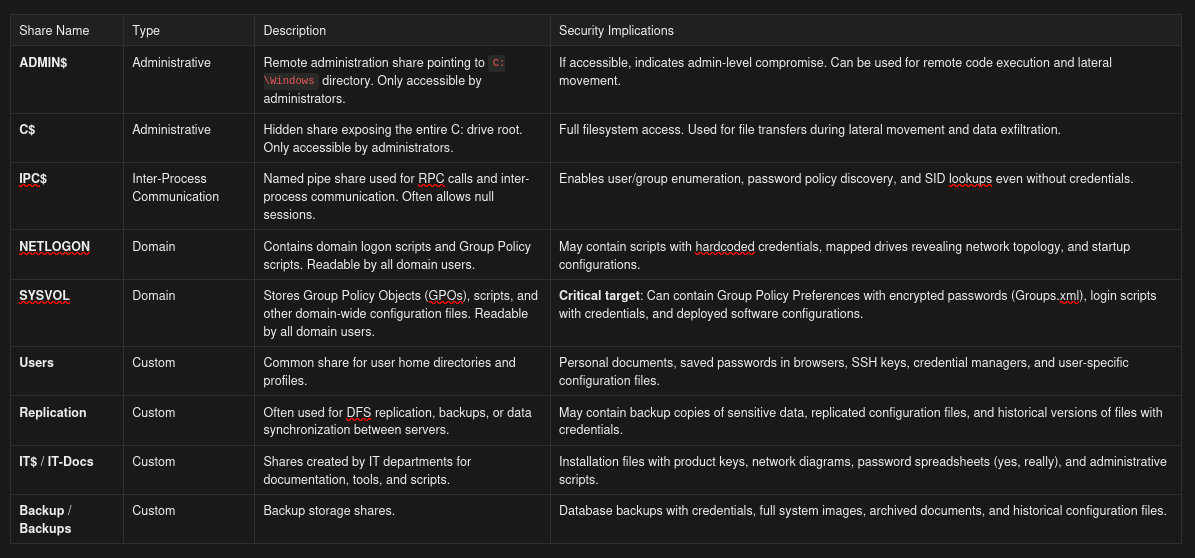
Understanding Common SMB Shares
Before we dive into enumeration tools, let’s understand the default shares you’ll encounter in Windows/AD environments:
smbclient
SMBClient is an interactive command-line tool that functions like an FTP client for SMB shares. It allows you to connect to shares, browse directories, and download files. The -N flag is crucial as it attempts a “null session” (anonymous authentication with no username or password), which surprisingly still works on many systems due to legacy configurations or SMB misconfigurations. SMBClient is perfect for manual exploration when you’ve identified interesting shares and want to dig through them interactively. Once connected, you can use standard commands like ls, cd, get, put, and mget to navigate and transfer files.
List shares anonymously (null session):
smbclient -L //domain/ -N
List shares with credentials:
smbclient -L //doamin/ -U username%[]
Anonymous login successful
Sharename Type Comment
--------- ---- -------
ADMIN$ Disk Remote Admin
C$ Disk Default share
IPC$ IPC Remote IPC
NETLOGON Disk Logon server share
Replication Disk
SYSVOL Disk Logon server share
Users Disk
The anonymous login was successful, which is already a security issue. We can see several shares: the standard administrative shares (ADMIN,C$,IPC$), the domain shares (NETLOGON, SYSVOL), and custom shares (Replication, Users). The next step is to check which of these we can actually access. TheReplication share is particularly interesting because it’s not a standard Windows share - it’s custom, which means it could contain anything from backup files to sensitive data that someone thought was “hidden” by not giving it an obvious name.
Connect to a specific share anonymously:
smbclient //domain/share -N
Connect to a specific share with credentials:
smbclient //doamin/share -U username%[]
Anonymous login successful
Try "help" to get a list of possible commands.
smb: \> ls
. D 0 Sat Jul 21 16:07:44 2018
.. D 0 Sat Jul 21 16:07:44 2018
active.htb D 0 Sat Jul 21 16:07:44 2018
10459647 blocks of size 4096. 5186824 blocks available
smb: \> exit
smbmap
SMBMap is a more automated and efficient tool compared to SMBClient. While SMBClient requires you to manually connect to each share and check access, SMBMap automatically tests all shares and displays your permissions (READ ONLY, READ/WRITE, or NO ACCESS) in a clear table format.
List shares with permissions (anonymous):
smbmap -H <domain>
List shares with credentials:
smbmap -H <domain> -u <username> -p <password>
Recursively list all files in accessible shares:
smbmap -H <domain> -r
Execute a command remotely (requires admin access):
smbmap -H <domain> -u <username> -p <password> -x 'ipconfig'
[*] Detected 1 hosts serving SMB
[*] Established 1 SMB connections(s) and 1 authenticated session(s)
[+] IP: 10.129.232.7:445 Name: active.htb Status: Authenticated
Disk Permissions Comment
---- ----------- -------
ADMIN$ NO ACCESS Remote Admin
C$ NO ACCESS Default share
IPC$ NO ACCESS Remote IPC
NETLOGON NO ACCESS Logon server share
Replication READ ONLY
SYSVOL NO ACCESS Logon server share
Users NO ACCESS
[*] Closed 1 connections
Enum4linux
Enum4linux is the Swiss Army knife of SMB enumeration - it’s a Perl script that wraps around multiple Samba tools (smbclient, rpcclient, net, nmblookup) and automates comprehensive Windows/Samba enumeration. What makes Enum4linux special is that it doesn’t just enumerate shares; it extracts users, groups, password policies, RID cycling information, OS details, domain information, and printer information all in one command.
Full enumeration (recommended):
enum4linux -a <domain>
Advanced enumeration with all options:
enum4linux -A <domain>
enum4linux -a 10.129.232.7
Starting enum4linux v0.9.1 ( http://labs.portcullis.co.uk/application/enum4linux/ ) on Sat Nov 02 2025
=========================================
| Target Information |
=========================================
Target ........... 10.129.232.7
RID Range ........ 500-550,1000-1050
Username ......... ''
Password ......... ''
Known Usernames .. administrator, guest, krbtgt, domain admins, root, bin, none
===================================
| Enumerating Workgroup/Domain |
===================================
[+] Got domain/workgroup name: ACTIVE
=====================================
| Nbtstat Information |
=====================================
Looking up status of 10.129.232.7
ACTIVE <00> - B <ACTIVE>
ACTIVE <1c> - G <ACTIVE>
ACTIVE <1b> - B <ACTIVE>
..__MSBROWSE__. <01> - <GROUP> B <ACTIVE>
MAC Address = 00-50-56-B9-7C-28
=====================================
| Session Check on 10.129.232.7 |
=====================================
[+] Server 10.129.232.7 allows sessions using username '', password ''
============================================
| Getting domain SID for 10.129.232.7 |
============================================
Domain Name: ACTIVE
Domain Sid: S-1-5-21-405608879-3187717380-1996298813
[+] Host is part of a domain (not a workgroup)
======================================
| OS information on 10.129.232.7 |
======================================
[E] Can't get OS info with smbclient
[+] Got OS info for 10.129.232.7 from srvinfo:
ACTIVE Wk Sv PDC Tim NT Domain Controller
platform_id : 500
os version : 6.1
server type : 0x80102b
================================
| Users on 10.129.232.7 |
================================
index: 0x10b0 RID: 0x1f6 acb: 0x00000011 Account: Administrator Name: (null) Desc: Built-in account for administering the computer/domain
index: 0xfbc RID: 0x1f7 acb: 0x00000215 Account: Guest Name: (null) Desc: Built-in account for guest access to the computer/domain
index: 0x10af RID: 0x1f5 acb: 0x00000215 Account: krbtgt Name: (null) Desc: Key Distribution Center Service Account
index: 0x10b1 RID: 0x452 acb: 0x00000210 Account: SVC_TGS Name: SVC_TGS Desc: (null)
user:[Administrator] rid:[0x1f4]
user:[Guest] rid:[0x1f5]
user:[krbtgt] rid:[0x1f6]
user:[SVC_TGS] rid:[0x452]
=================================
| Share Enumeration |
=================================
Sharename Type Comment
--------- ---- -------
ADMIN$ Disk Remote Admin
C$ Disk Default share
IPC$ IPC Remote IPC
NETLOGON Disk Logon server share
Replication Disk
SYSVOL Disk Logon server share
Users Disk
[+] Attempting to map shares on 10.129.232.7
//10.129.232.7/ADMIN$ Mapping: DENIED Listing: N/A Writing: N/A
//10.129.232.7/C$ Mapping: DENIED Listing: N/A Writing: N/A
//10.129.232.7/IPC$ Mapping: OK Listing: DENIED Writing: N/A
//10.129.232.7/NETLOGON Mapping: DENIED Listing: N/A Writing: N/A
//10.129.232.7/Replication Mapping: OK Listing: OK Writing: N/A
//10.129.232.7/SYSVOL Mapping: DENIED Listing: N/A Writing: N/A
//10.129.232.7/Users Mapping: DENIED Listing: N/A Writing: N/A
===================================
| Password Policy Information |
===================================
[+] Attaching to 10.129.232.7 using a NULL share
[+] Trying protocol 139/SMB...
[+] Found domain(s):
[+] ACTIVE
[+] Builtin
[+] Password Info for Domain: ACTIVE
[+] Minimum password length: 7
[+] Password history length: 24
[+] Maximum password age: 41 days 23 hours 53 minutes
[+] Password Complexity Flags: 000000
[+] Domain Refuse Password Change: 0
[+] Domain Password Store Cleartext: 0
[+] Domain Password Lockout Admins: 0
[+] Domain Password No Clear Change: 0
[+] Domain Password No Anon Change: 0
[+] Domain Password Complex: 0
[+] Minimum password age: 1 day 4 minutes
[+] Reset Account Lockout Counter: 30 minutes
[+] Locked Account Duration: 30 minutes
[+] Account Lockout Threshold: None
[+] Forced Log off Time: Not Set
===========================
| Groups on 10.129.232.7 |
===========================
[+] Getting builtin groups:
group:[Account Operators] rid:[0x224]
group:[Server Operators] rid:[0x225]
group:[Print Operators] rid:[0x226]
group:[Backup Operators] rid:[0x227]
group:[Replicator] rid:[0x228]
[+] Getting builtin group memberships:
[+] Getting local groups:
group:[Cert Publishers] rid:[0x205]
group:[RAS and IAS Servers] rid:[0x229]
group:[Allowed RODC Password Replication Group] rid:[0x23b]
group:[Denied RODC Password Replication Group] rid:[0x23c]
group:[DnsAdmins] rid:[0x44e]
[+] Getting local group memberships:
[+] Getting domain groups:
group:[Domain Admins] rid:[0x200]
group:[Domain Users] rid:[0x201]
group:[Domain Guests] rid:[0x202]
group:[Domain Computers] rid:[0x203]
group:[Domain Controllers] rid:[0x204]
group:[Schema Admins] rid:[0x206]
group:[Enterprise Admins] rid:[0x207]
group:[Group Policy Creator Owners] rid:[0x208]
[+] Getting domain group memberships:
Group 'Domain Admins' (RID: 512) has member: ACTIVE\Administrator
Group 'Group Policy Creator Owners' (RID: 520) has member: ACTIVE\Administrator
Group 'Schema Admins' (RID: 518) has member: ACTIVE\Administrator
Group 'Enterprise Admins' (RID: 519) has member: ACTIVE\Administrator
Group 'Domain Controllers' (RID: 516) has member: ACTIVE\DC$
=========================================
| Getting printer info for 10.129.232.7 |
=========================================
No printers returned.
enum4linux complete on Sat Nov 02 21:45:30 2025
Domain: ACTIVE (SID S-1-5-21-405608879-3187717380-1996298813) — a spotted PDC running Windows Server 2008 R2 that hands us a tidy reconnaissance breadcrumb trail: enumerated accounts include Administrator (RID 0×1f4), a sleepy Guest, the all-important krbtgt (KDC), and a juicy service account SVC_TGS (RID 0×452) — an ideal Kerberoasting target. The password policy reads like it was written by someone who hates security: minimum length 7, complexity disabled, and no lockout threshold — meaning password-spray attacks can be run at scale with near impunity. A readable Replication share sits open like a treasure chest (perfect for hunting Group Policy Preferences, scripts, or credential leftovers), while IPC$ remains a useful pinch-point for RPC work. Add in the usual cabal of privileged groups (Domain Admins, Enterprise Admins, Schema Admins) plus DnsAdmins and Backup Operators, and you’ve got multiple, realistic escalation routes — crack a service account via Kerberoast, nab credentials from Replication, or leverage a Backup/DNS admin to pivot straight to Domain Admin. In short: sloppy policy + exposed shares + tempting service accounts = a red-carpet path for an attacker.
SMB enumeration is one of the most valuable reconnaissance techniques in Active Directory pentesting. Through the tools we’ve covered - SMBClient for interactive manual exploration, SMBMap for quick automated share enumeration with permissions, and Enum4linux for comprehensive user/group/policy extraction - you can build a complete picture of accessible data, user accounts, and security policies.
Conclusion
In this blog, we’ve covered the fundamentals of DNS and SMB enumeration to give you a solid foundation in Active Directory reconnaissance. You’ve learned how to manually discover domain infrastructure, identify critical systems, enumerate users and groups, and find accessible shares - all essential skills for any AD pentester.
However, these manual techniques are just the beginning of your AD pentesting journey. This is the first blog in a comprehensive series where we’ll progressively build on these foundations. We’ll explore advanced automated tools that scale enumeration across entire networks, dive into exploitation techniques, master lateral movement and privilege escalation, and eventually understand both offensive and defensive perspectives of Active Directory security.
Each blog in this series builds upon the previous ones, taking you from basic manual enumeration to advanced techniques used in real-world engagements. By the end of this series, you’ll have a well-rounded understanding of Active Directory pentesting from both red team and blue team viewpoints.
Stay tuned for the next blog where we’ll take enumeration to the next level!
