
Introduction
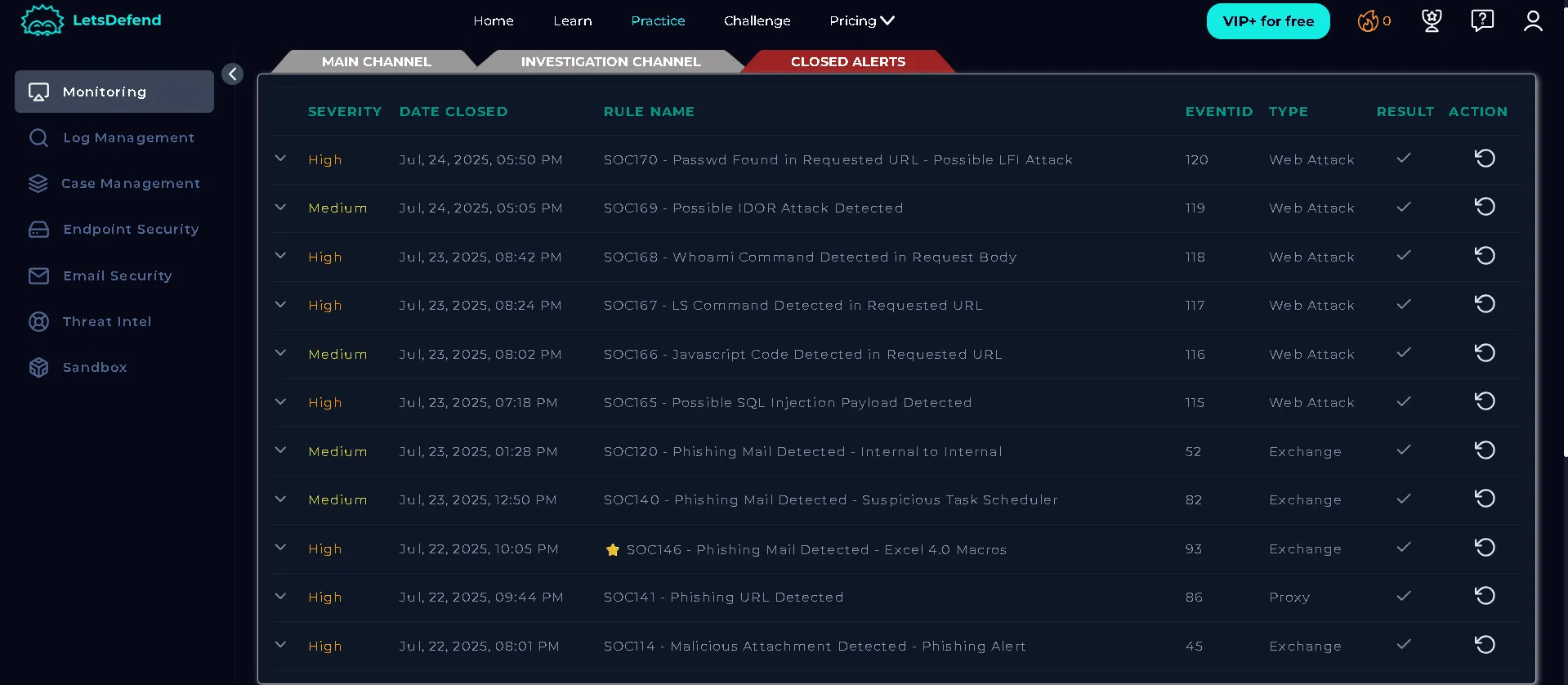
This blog presents a hands-on walkthrough of SOC investigations performed using the LetsDefend platform, drawing directly from cases I analyzed and closed in my LetsDefend lab environment. By leveraging a Security Information and Event Management (SIEM) system, I systematically detected, investigated, and responded to a range of attack scenarios — including phishing, SQL injection, XSS, command injection, IDOR, and LFI/RFI. For each alert, I break down the practical steps I followed to validate the threat, interpret log evidence, and determine whether the attack was successful. The goal is to provide clear, actionable guidance for other analysts, grounded in real-world examples from my LetsDefend SOC lab experience.
Closed alerts on lets defend SOC lab
- Phishing Attacks
Overview:
Phishing is a social engineering attack where adversaries send deceptive emails to trick recipients into clicking malicious links or opening infected attachments. The goal is often to steal credentials, deliver malware, or gain unauthorized access.
Investigation Steps:
Alert Review: Start with the SIEM alert (e.g., “Malicious Attachment Detected”). Note sender, recipient, subject, and attachment details.
Attachment Analysis: Use sandbox tools (AnyRun, HybridAnalysis, VirusTotal) to analyze the file for malware or suspicious behavior.
Sender Reputation: Check the sender’s IP and domain against abuse databases (e.g., AbuseIPDB) for prior malicious activity.
Delivery Confirmation: Verify if the email reached the recipient or was blocked.
Execution Evidence: Review endpoint logs for signs the attachment was opened (process creation, terminal activity, outbound connections).
C2 Communication: Check for outbound traffic to known command-and-control (C2) addresses.
How to Identify Success:
Unsuccessful: No evidence of file execution, no outbound connections, email blocked.
Successful: Sandbox confirms malware, endpoint logs show execution (e.g., regsvr32 command from Excel macros), device communicates with C2 addresses.
Example Case:
A suspicious email with a malicious Excel attachment was sent to a user. Sandbox analysis revealed harmful macros and C2 addresses. Endpoint logs showed the regsvr32 command executed and outbound connections to malicious domains, confirming a successful attack.
2. SQL Injection (SQLi)
Overview:
SQL Injection is a web attack where adversaries manipulate SQL queries via user input fields to access or modify database data. Common payloads include ' OR 1=1 – and similar constructs.
Investigation Steps:
Alert Review: Identify suspicious requests in SIEM logs, focusing on endpoints like /search/?q=.
Payload Decoding: Decode URLs to reveal injected SQL payloads.
Source Filtering: Filter logs by attacker IP to see all related requests.
Response Analysis: Examine HTTP response codes and sizes (500 errors suggest failed injection, 200 OK with data may indicate success).
How to Identify Success:
Unsuccessful: All requests return 500 errors, no data leaked, response sizes unchanged.
Successful: 200 OK responses with different sizes, data returned that shouldn’t be accessible.
Example Case:
Multiple SQLi attempts triggered 500 errors, with no data returned. Only non-malicious requests received 200 OK, confirming the attack was unsuccessful.
3. Cross-Site Scripting (XSS)
Overview:
XSS allows attackers to inject malicious scripts into web pages viewed by other users. Reflected XSS occurs when the payload is in the URL and immediately reflected back.
Investigation Steps:
Alert Review: Identify requests with suspicious parameters (e.g., q containing script tags).
Source Filtering: Filter logs by attacker IP to see all XSS attempts.
Response Analysis: Check HTTP status codes (302 redirects suggest payloads were not executed).
How to Identify Success:
Unsuccessful: Requests are redirected, no script execution.
Successful: Payloads are reflected and executed in the browser
Example Case:
All XSS attempts were redirected (302), indicating no successful exploitation.
4. Command Injection
Overview:
Command Injection exploits vulnerabilities that allow attackers to execute arbitrary system commands via web requests.
Investigation Steps:
Alert Review: Check SIEM alerts for suspicious command patterns (e.g., “whoami” in request body).
Source Filtering: Filter logs by attacker IP to see all command attempts.
Endpoint Review: Examine command history on the targeted device for evidence of execution.
How to Identify Success:
Unsuccessful: No commands executed, false positive (e.g., “skills” triggers “ls” rule).
Successful: Command history shows attacker commands executed (e.g., “whoami”), device must be contained.
Example Case:
The attacker sent multiple commands, and endpoint logs confirmed execution, marking the alert as a true positive.
- Insecure Direct Object Reference (IDOR)
Overview:
IDOR occurs when attackers manipulate object identifiers (like user IDs) in requests to access data belonging to other users.
Investigation Steps:
Source Filtering: Filter logs by attacker IP to see all IDOR attempts.
Request Analysis: Examine requests for changing IDs and accessing different user data.
Response Analysis: Check for 200 OK status and varying response sizes (indicating different data returned).
How to Identify Success:
Unsuccessful: No data returned, identical response sizes.
Successful: Different data returned for each request, 200 OK status.
Example Case:
Requests with different IDs returned varying data and 200 OK, confirming a successful IDOR attack.
- Local/Remote File Inclusion (LFI/RFI)
Overview:
LFI/RFI attacks exploit web applications by including files from the server (LFI) or remote sources (RFI), often to read sensitive files or execute code.
Investigation Steps:
Source Filtering: Filter logs by attacker IP to find relevant requests.
Request Analysis: Look for file paths (e.g., /etc/passwd) in URLs.
Response Analysis: Check status codes and response sizes (500 error and size 0 suggest failure).
How to Identify Success:
Unsuccessful: 500 errors, no data returned.
Successful: 200 OK, sensitive file contents returned.
Example Case:
The LFI attempt returned a 500 error and no data, indicating the attack was unsuccessful.
Conclusion
A SIEM platform like LetsDefend enables SOC analysts to systematically investigate alerts, validate attack attempts, and determine their impact. By following structured steps — alert review, log filtering, payload analysis, and endpoint inspection — analysts can distinguish between true and false positives and take appropriate action to contain threats. Understanding the attack flow and evidence is key to effective incident response.
