
Hallo Peeps!! 🙌
Today we will explore how to gain access to smart TVs especially android TVs.
Detailed video is already available 👇
https://shorturl.at/2T5wx
so, lets start
Step 1 : Switch to Developer Mode
- Go to Settings < Device Preferences < About
- In “About” scroll down untill you find “Build” option
- Press Build for 7 times, untill you get this message - “You are now a developer!”
- Go back to “Device Preference” and select “Developer Options”.
- In “Developer Options” , Enable “USB Debugger”.
Step 2 : Open your terminal or command prompt
Ensure your laptop and TV are on the same Wi-Fi network. You will need ADB installed on your computer.
- Connect to your smart tv with the below command
adb connect WIFI-IP:5555
- A popup will appear on the TV asking to “Allow USB Debugging?” Select Always allow and click OK.
- Now you can play with your TV just by using following commands :
Ghost Volume - adb shell input keyevent 24
Force Website - adb shell am start -a android.intent.action.VIEW -d "https://techonquer.com"
Go to home - adb shell input keyevent 3
On-Screen Text - adb shell am broadcast -a jp.co.cyberagent.stf.ACTION_SET_TEXT --es text "SECURITY ALERT"
Remote Reboot - adb reboot
Screen Overlay - adb shell wm density 300
Downloads - adb pull /sdcard/screen.png
Now, lets understand what is this ADB and how it works?
ADB
ADB stands for Android Debug Bridge.
It is a command-line tool that allows a computer to communicate directly with an Android-based device (a TV, a smartphone, or a tablet).
How ADB Works:
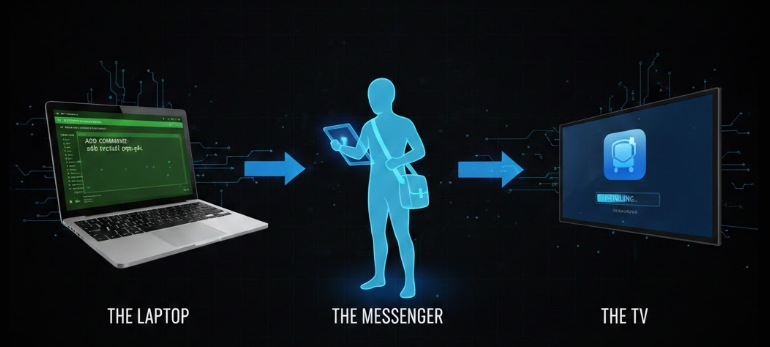
The Client (The Laptop): This is the command prompt or terminal window where you type your commands. It’s the “remote control” for the developer.
The Server (The Messenger): A background process that runs on your laptop. Its job is to manage the communication between your client and any connected devices.
The Daemon (The TV): A small program that runs in the background of your TV. It stays “asleep” until you enable USB Debugging, which tells it to start listening for commands from the server
Thats it for today…
See you guys in the next adventure

