🕵️♂️ Steganography : How Malware Hides Inside Images
Steganography is the art of hiding data inside other files so that the file looks harmless but secretly carries something else — often malware.
In malware analysis, steganography is commonly used to hide executables inside images so they can bypass detection and look innocent to victims.
This blog explains two common steganography techniques in the simplest way possible.
🔹 Technique 1: Appending Data After an Image
1) Concept :
Instead of modifying the image itself, attackers attach extra data at the end of the image file.
Most image viewers:
Read only valid image data
Ignore anything after the image ends
So the image opens normally — but malware is secretly attached.
PNG File Structure (Very Important)
A PNG file has:
Header – Identifies the file as PNG
Chunks – Contain image data
IEND chunk – Marks the end of the image
Anything after IEND should not exist — but attackers put data there anyway.
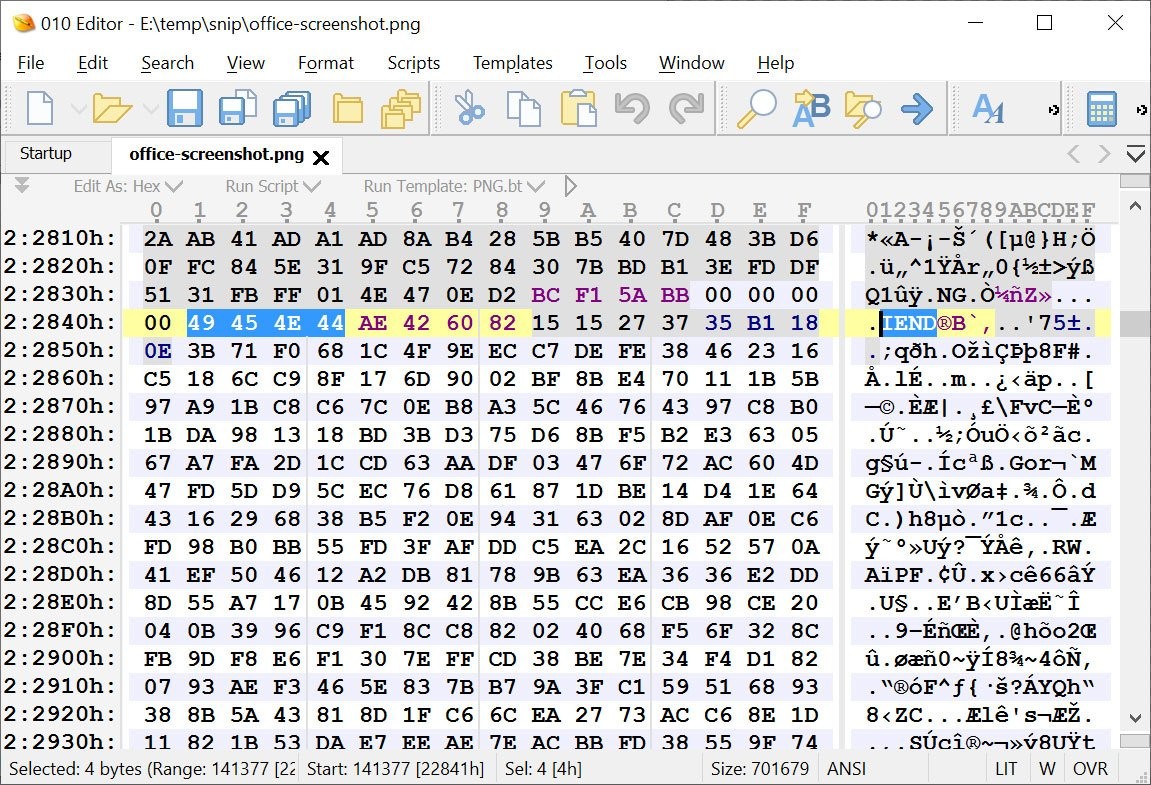
- How Analysts Detect This
Open the file in a hex editor
Locate the IEND chunk
Check if data exists after it
Look for magic bytes like:
PK → ZIP archive
MZ → Windows executable
🔹 Technique 2: LSB Steganography
2) Concept
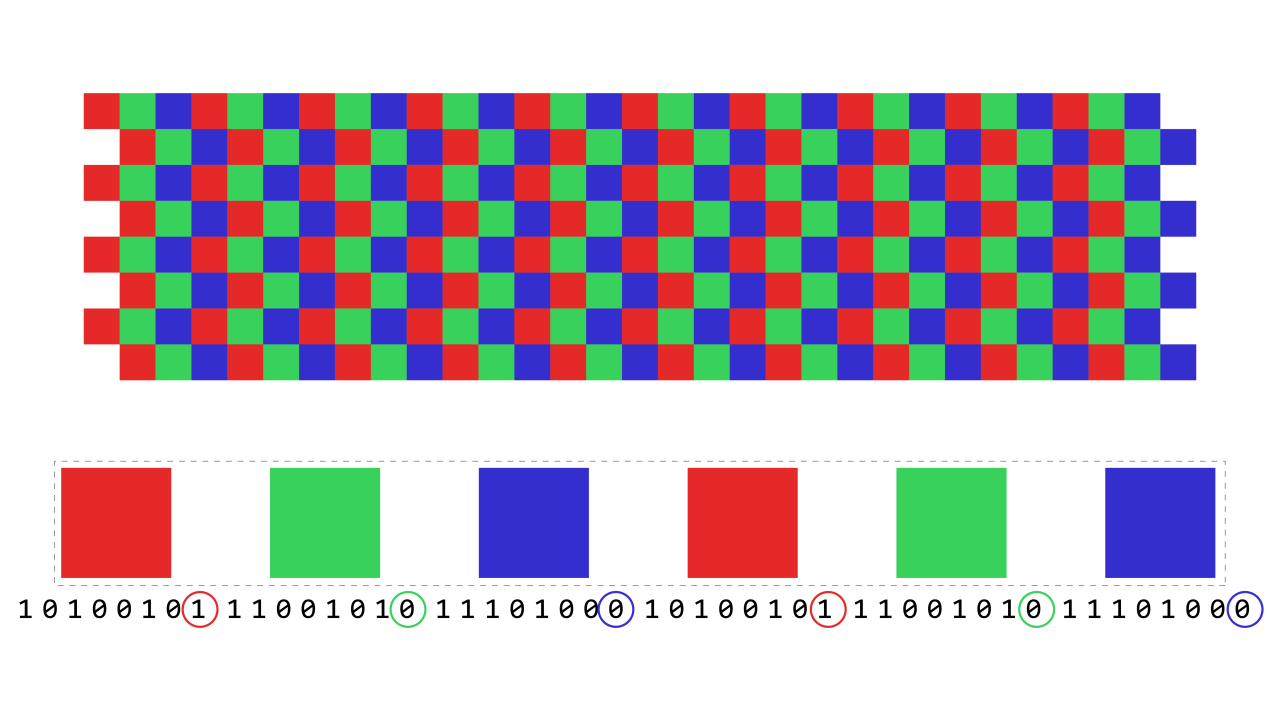
Instead of adding data at the end, attackers modify individual bits inside image pixels.
They change only the Least Significant Bit (LSB):
Human eyes cannot detect the change
File size remains the same
Image looks identical
How Pixels Store Data
Each pixel has:
LSBSteg.py
#!/usr/bin/env python
# coding:UTF-8
"""LSBSteg.py
Usage:
LSBSteg.py encode -i <input> -o <output> -f <file>
LSBSteg.py decode -i <input> -o <output>
Options:
-h, --help Show this help
--version Show the version
-f,--file=<file> File to hide
-i,--in=<input> Input image (carrier)
-o,--out=<output> Output image (or extracted file)
"""
import cv2
import docopt
import numpy as np
class SteganographyException(Exception):
pass
class LSBSteg():
def __init__(self, im):
self.image = im
self.height, self.width, self.nbchannels = im.shape
self.size = self.width * self.height
self.maskONEValues = [1,2,4,8,16,32,64,128]
#Mask used to put one ex:1->00000001, 2->00000010 .. associated with OR bitwise
self.maskONE = self.maskONEValues.pop(0) #Will be used to do bitwise operations
self.maskZEROValues = [254,253,251,247,239,223,191,127]
#Mak used to put zero ex:254->11111110, 253->11111101 .. associated with AND bitwise
self.maskZERO = self.maskZEROValues.pop(0)
self.curwidth = 0 # Current width position
self.curheight = 0 # Current height position
self.curchan = 0 # Current channel position
def put_binary_value(self, bits): #Put the bits in the image
for c in bits:
val = list(self.image[self.curheight,self.curwidth]) #Get the pixel value as a list
if int(c) == 1:
val[self.curchan] = int(val[self.curchan]) | self.maskONE #OR with maskONE
else:
val[self.curchan] = int(val[self.curchan]) & self.maskZERO #AND with maskZERO
self.image[self.curheight,self.curwidth] = tuple(val)
self.next_slot() #Move "cursor" to the next space
def next_slot(self):#Move to the next slot were information can be taken or put
if self.curchan == self.nbchannels-1: #Next Space is the following channel
self.curchan = 0
if self.curwidth == self.width-1: #Or the first channel of the next pixel of the same line
self.curwidth = 0
if self.curheight == self.height-1:#Or the first channel of the first pixel of the next line
self.curheight = 0
if self.maskONE == 128: #Mask 1000000, so the last mask
raise SteganographyException("No available slot remaining (image filled)")
else: #Or instead of using the first bit start using the second and so on..
self.maskONE = self.maskONEValues.pop(0)
self.maskZERO = self.maskZEROValues.pop(0)
else:
self.curheight +=1
else:
self.curwidth +=1
else:
self.curchan +=1
def read_bit(self): #Read a single bit int the image
val = self.image[self.curheight,self.curwidth][self.curchan]
val = int(val) & self.maskONE
self.next_slot()
if val > 0:
return "1"
else:
return "0"
def read_byte(self):
return self.read_bits(8)
def read_bits(self, nb): #Read the given number of bits
bits = ""
for i in range(nb):
bits += self.read_bit()
return bits
def byteValue(self, val):
return self.binary_value(val, 8)
def binary_value(self, val, bitsize): #Return the binary value of an int as a byte
binval = bin(val)[2:]
if len(binval) > bitsize:
raise SteganographyException("binary value larger than the expected size")
while len(binval) < bitsize:
binval = "0"+binval
return binval
def encode_text(self, txt):
l = len(txt)
binl = self.binary_value(l, 16) #Length coded on 2 bytes so the text size can be up to 65536 bytes long
self.put_binary_value(binl) #Put text length coded on 4 bytes
for char in txt: #And put all the chars
c = ord(char)
self.put_binary_value(self.byteValue(c))
return self.image
def decode_text(self):
ls = self.read_bits(16) #Read the text size in bytes
l = int(ls,2)
i = 0
unhideTxt = ""
while i < l: #Read all bytes of the text
tmp = self.read_byte() #So one byte
i += 1
unhideTxt += chr(int(tmp,2)) #Every chars concatenated to str
return unhideTxt
def encode_image(self, imtohide):
w = imtohide.width
h = imtohide.height
if self.width*self.height*self.nbchannels < w*h*imtohide.channels:
raise SteganographyException("Carrier image not big enough to hold all the datas to steganography")
binw = self.binary_value(w, 16) #Width coded on to byte so width up to 65536
binh = self.binary_value(h, 16)
self.put_binary_value(binw) #Put width
self.put_binary_value(binh) #Put height
for h in range(imtohide.height): #Iterate the hole image to put every pixel values
for w in range(imtohide.width):
for chan in range(imtohide.channels):
val = imtohide[h,w][chan]
self.put_binary_value(self.byteValue(int(val)))
return self.image
def decode_image(self):
width = int(self.read_bits(16),2) #Read 16bits and convert it in int
height = int(self.read_bits(16),2)
unhideimg = np.zeros((width,height, 3), np.uint8) #Create an image in which we will put all the pixels read
for h in range(height):
for w in range(width):
for chan in range(unhideimg.channels):
val = list(unhideimg[h,w])
val[chan] = int(self.read_byte(),2) #Read the value
unhideimg[h,w] = tuple(val)
return unhideimg
def encode_binary(self, data):
l = len(data)
if self.width*self.height*self.nbchannels < l+64:
raise SteganographyException("Carrier image not big enough to hold all the datas to steganography")
self.put_binary_value(self.binary_value(l, 64))
for byte in data:
byte = byte if isinstance(byte, int) else ord(byte) # Compat py2/py3
self.put_binary_value(self.byteValue(byte))
return self.image
def decode_binary(self):
l = int(self.read_bits(64), 2)
output = b""
for i in range(l):
output += bytearray([int(self.read_byte(),2)])
return output
def main():
args = docopt.docopt(__doc__, version="0.2")
in_f = args["--in"]
out_f = args["--out"]
in_img = cv2.imread(in_f)
steg = LSBSteg(in_img)
lossy_formats = ["jpeg", "jpg"]
if args['encode']:
#Handling lossy format
out_f, out_ext = out_f.split(".")
if out_ext in lossy_formats:
out_f = out_f + ".png"
print("Output file changed to ", out_f)
data = open(args["--file"], "rb").read()
res = steg.encode_binary(data)
cv2.imwrite(out_f, res)
elif args["decode"]:
raw = steg.decode_binary()
with open(out_f, "wb") as f:
f.write(raw)
if __name__=="__main__":
main()
How Hidden Data Is Extracted
Read image bytes
Extract the LSB of each byte
Combine bits → bytes
Convert bytes → ASCII
Example:
01010100 → 0x54 → 'T'
Repeat this process and you may recover:
“This is a secret.”
Technique 4: Image Metadata Injection (EXIF / XMP Abuse)
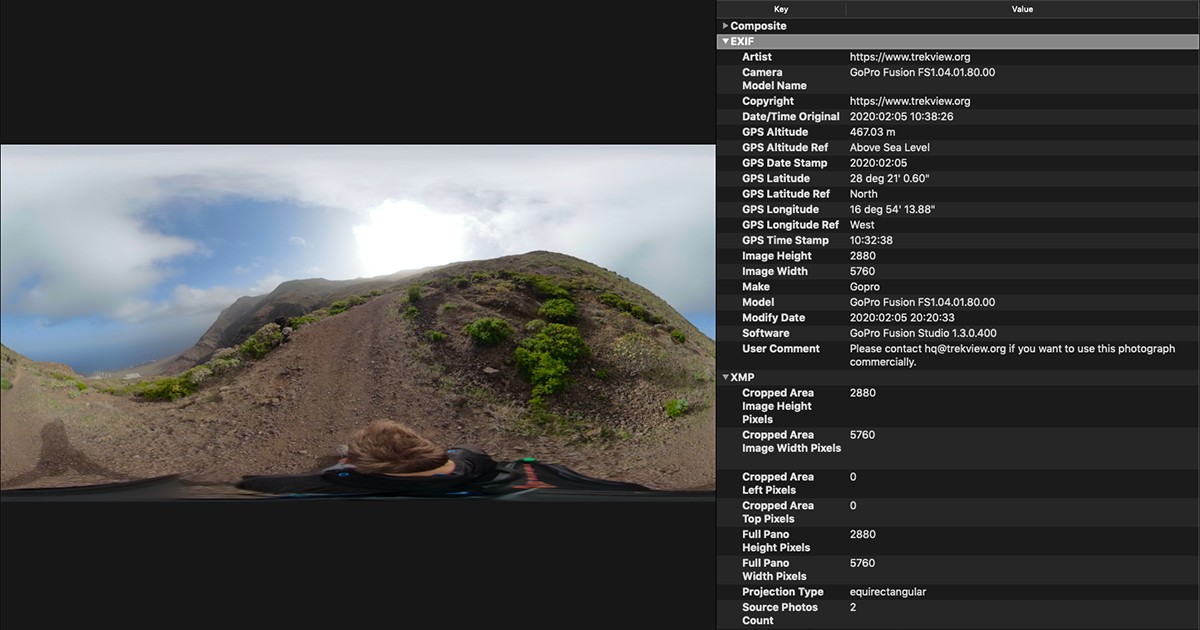
One of the most underrated and powerful steganography techniques used in modern malware is image metadata injection.
Unlike pixel-level or EOF-based steganography, this technique hides malicious data in a place that:
Does not affect image rendering Is rarely inspected
Is explicitly designed to store arbitrary text
That place is image metadata.
Run:
exiftool suspicious.jpg
This dumps all EXIF + XMP metadata.
What to Look For
Red flags include:
Very long strings in text fields
Random-looking characters
Base64-style data (A–Z a–z 0–9 + / =)
Fields that shouldn’t be large
Example suspicious output:
User Comment : U0dWc2JHOGdWMjl5YkdRZ1pXNWpiMjB1
Image Description : 4f8a9c2e9b0eaa7c8b9d*****
Identify the Abused Field
Attackers usually hide data in:
- UserComment
- ImageDescription
- XPComment
- Custom XMP tags
Example:
UserComment : VGhpcyBpcyBhIHNlY3JldCBjb21tYW5k
echo "VGhpcyBpcyBhIHNlY3JldCBjb21tYW5k" | base64 -d
This is a secret 0×72
Here’s how malware (or an analyst) would extract metadata programmatically:
import subprocess
result = subprocess.check_output(
["exiftool", "-UserComment", "suspicious.jpg"]
)
hidden = result.decode().split(":")[1].strip()
print(hidden)
Malware replaces print() with:
- base64.b64decode()
- AES.decrypt()
- exec() or memory loader
