Each android application is a zip archive with .apk extension. You can open it with application like Winrar or 7zip. The official announcement for apk file type is application/vnd.android.package-archive. You can unzip apk file with this command:
unzip app.apk
How Get APK Files Downloaded From Play Store
Download and Installing APK from Play Store.
Get the APK path of installed app with this command:
adb shell pm path <Package Name>
Pull the APK file.
adb pull <APK PATH>
Example:

<aside>
💡 This process does not require root privilege.
</aside>
<aside>
💡 Package name in android apps is a unique name that use as an identifier for app.
</aside>
PM (Package Manager)
pm list packages # Print all installed packages
pm list packages -3 # Print third-party installed packages
pm list packages -s # Print systemize installed packages
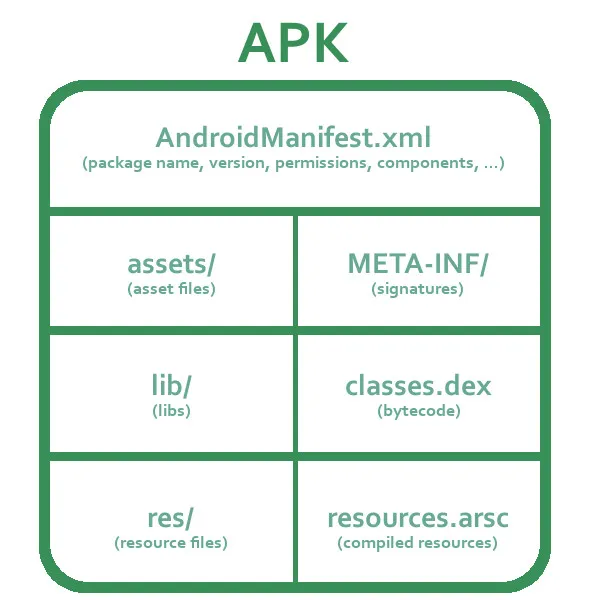
APK (Android Package Kit) structure
Assets
This directory contains external resource like pictures, fonts, sounds, certificate file and etc. It’s a important directory during reverse engineering process. We always look at this directory. For example if you want to bypass certificate pinning, it’s good to look at here for finding certificate file.
Files in the assets directory are not compiled by Android and behave like a file system. You can access the files in assets from Java as well, but they are not indexed, which means they may be slower to access than resources.
Com
Contains the compiled Java or Kotlin classes files that make up the application’s codebase. that usually not important for us.
Lib
This directory contains share object file (.so) or native (C/C++) libraries which app are using theme. Usually this directory contains another directories with names like x86, armeabi, armeabi-v7a and etc.
Developers usually use C/C++ codes in some situations which they need better performance than Java. For example sometimes we want to do some graphical process like rendering an animation or working with OpenGL and etc.
<aside>
💡 Usually we use computers with x86 architecture. So the emulators we use are based on this architecture. In some situations you may encounter a situation which the app just support ARM based devices. Don’t worry you can use ARM to x86 translator on most of emulators like Genymotion but consider the process is very slow.
</aside>
<aside>
💡 Reverse engineering of C/C++ code are harder than Java codes. Therefor some developers try to hide important things like API keys or other things in this section. It’s always important to check here for secrets.
</aside>
META-INF
This directory contains file and folders which related to signing process of apks.
Res
This is similar to assets folder but a little bit different. The resources directory contains all the resources in its subdirectories, such as images, audio, video, text strings, layouts, themes, and more. Usually this we have multiple instance of this resource for different For example we can see an app icon which is in multiple different sizes that is for Icon size in different screen sizes. Also you may see some images and texts in different languages for multi language support.
Resources are compiled by Android and are easily accessible from your application from the R class. Resources are also indexed, which means they can be accessed quickly and efficiently.
<aside>
💡 Sometime developers store certificate file in this directory. Therefore always check for interesting files in this directory.
</aside>
AndroidManifest.xml
This is an xml file which describe about application components, needed permissions, needed features and some information about package name, main activity and so on.
This file is convert to binary format during compile process.
Classes.dex
This file contains Java codes which is compiled to Samli language that is Dalvik VM supported format.
Resources.arsc
The resources.arsc file is an important component of an Android application’s compiled resources. It stands for “Android Resource Compiled” and contains precompiled resources such as strings, layouts, colors, dimensions, and other assets used by the Android application.
When you develop an Android application, you define its resources in XML files under the res/ directory of your project. These resources are typically referenced by their assigned IDs in your Java or Kotlin code. However, when you build the application, these resources are compiled and packaged into the resources.arsc file.
By precompiling the resources into the resources.arsc file, the Android system can efficiently retrieve the required resources without having to parse and process XML files every time. This helps improve the performance of the application and reduces the amount of work required during runtime.
