
In today’s hyper-connected world, public Wi-Fi is everywhere, from airports and cafés to hotels and malls. While we value its convenience, attackers value its vulnerabilities. Among the most effective and least-detected wireless threats today is the Evil Twin Attack, a method where a hacker clones a trusted Wi-Fi network to lure users into a digital trap.
What is an Evil Twin?**
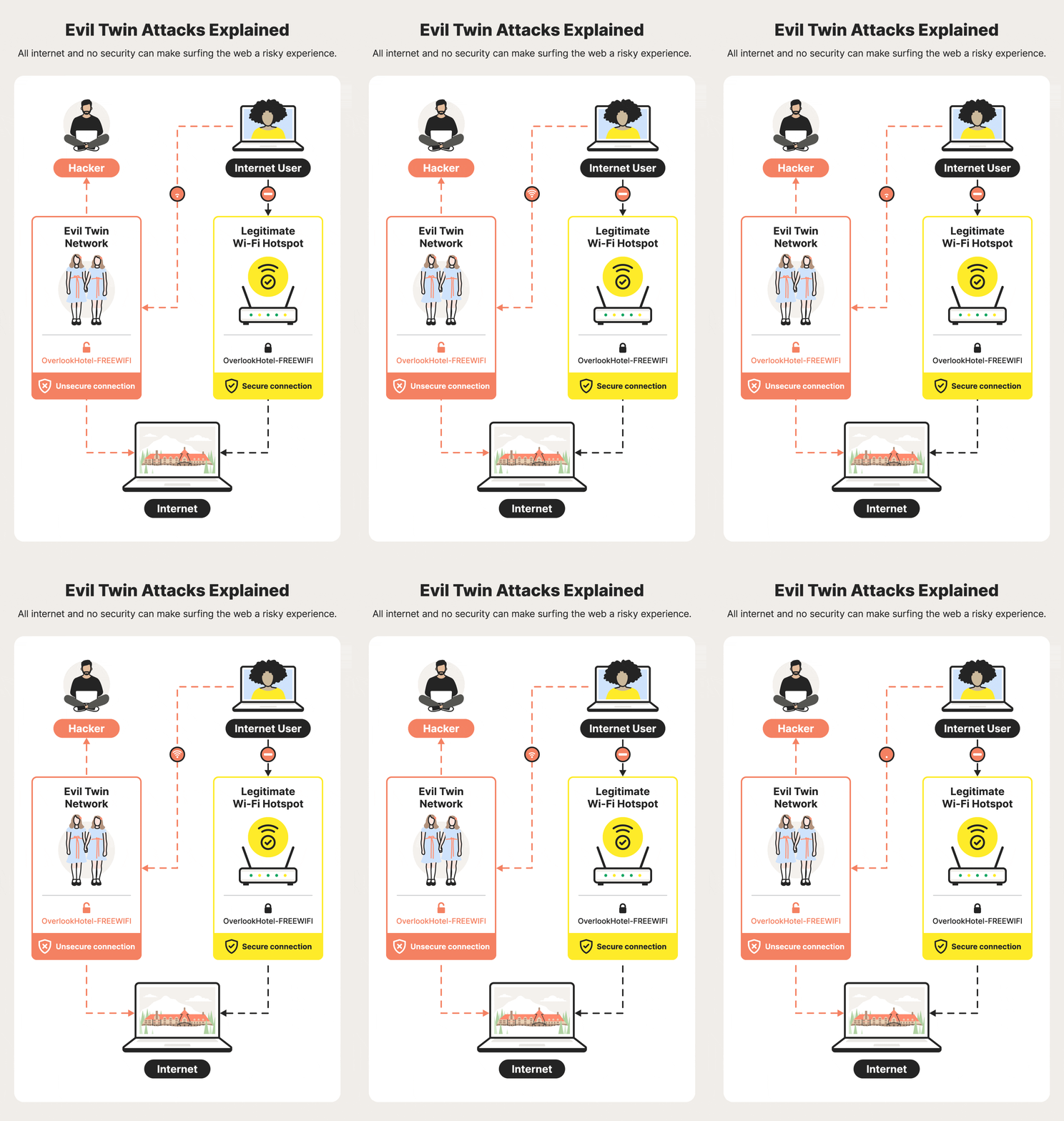
An Evil Twin is a rogue Wi-Fi access point created to impersonate a legitimate network. To a victim, it looks identical to a trusted connection, such as “XYZ Hotel & Restaurant WiFi”. However, once connected, all your data, passwords, messages, and session cookies, passes through a server controlled by the attacker.
How the Attack Works - An Evil Twin attack generally follows a calculated lifecycle:
1. Reconnaissance: The attacker scans for nearby networks using tools like airodump-ng or Wireshark to identify the target’s SSID (network name) and MAC address.
2. Creating the Clone: A fake access point is set up using tools like Wifiphisher or Airgeddon. The attacker often uses a stronger signal than the legitimate router so that devices automatically prefer the “Twin”.
3. Forcing Disconnections: To force users off the real network and onto the fake one, attackers often launch deauthentication (deauth) attacks. This involves sending packets to connected users that kick them offline, forcing their devices to reconnect to the strongest available signal: the Evil Twin.
4. Credential Harvesting: Once the victim connects, the attacker may display a phishing page or a captive portal. These pages often look like legitimate login portals for Google, Microsoft 365, or the café’s own Wi-Fi system. Once you enter your credentials, the attacker receives them instantly.
Real-World Impact:
This is not a hypothetical threat. A recent evaluation by the U.S. Department of the Interior revealed that several bureau networks were successfully breached using Evil Twin attacks. Using portable units built for less than $200, investigators intercepted user credentials and gained access to internal government systems—all while remaining undetected by security guards. Similarly, in July 2024, a man was charged for running a fake Wi-Fi network to steal credentials from passengers on a commercial flight.
How to Spot the “Evil”: - Detecting these attacks is difficult for the average user, but there are warning signs:
• Duplicate Network Names: Be wary if you see two identical Wi-Fi names in an area where there should only be one.
• Unsecured Warnings: If your device warns that a network is “unsecured” or “not encrypted,” even if you have connected to it before, avoid it.
• Suspicious Captive Portals: Look for typos, grammatical errors, or unusual requests for personal information on Wi-Fi login pages.
How to Protect Yourself:
To stay safe in the “wireless warfare” zone, follow these best practices:
• Use a VPN: A Virtual Private Network encrypts your traffic, making it unreadable to an attacker even if you connect to an Evil Twin.
• Turn Off Auto-Connect: Disable the feature that allows your phone or laptop to automatically join familiar Wi-Fi networks.
• Prefer Mobile Hotspots: Your phone’s personal hotspot is significantly safer than any unknown public Wi-Fi.
• Enable 2FA: Two-factor authentication provides a critical second layer of defense; even if a hacker steals your password, they won’t be able to access your account.
For Organisations:
Companies should implement a Wireless Intrusion Prevention System (WIPS) to automatically detect and block rogue access points. Furthermore, moving away from simple pre-shared keys to certificate-based authentication (like WPA2-Enterprise) makes Evil Twin attacks significantly harder to execute.
Conclusion: Evil Twin attacks are devastatingly simple for hackers but can be devastating for victims. By staying alert and using the right security tools, you can ensure you don’t connect to the wrong twin.
