
The Challenge
We’re handed a PNG file. I open it up, expecting something, a QR code, some weird artifact, a rickroll hidden in plain sight. Instead? ☹️
Pure. Black. Nothing.
Like staring into the void. The void stares back. The void gives you nothing.
But then there’s the hint:
“Trust the math, not your eyes. Turn up the lights — use a Threshold filter, any pixel that isn’t exactly zero will turn bright white.”
Okay. Okay. So the image looks black, but mathematically, not every pixel is black. There’s hidden data lurking in near-zero pixel values, completely invisible to the human eye. Classic steganography move hide your data in the noise, in the margins, in the whispers of color that sit just above #000000.
—
The Investigation
Step 1 : Recognizing the Trick
The key insight here is understanding how pixel data works. A pixel with a value of #000001 looks black to you. Your monitor can’t render that difference. Your eyes definitely can’t. But the data is there, quietly waiting.
The challenge is essentially screaming: “I’m not empty, I just need the right light.”
Step 2 : Firing Up CyberChef
Heading over to CyberChef
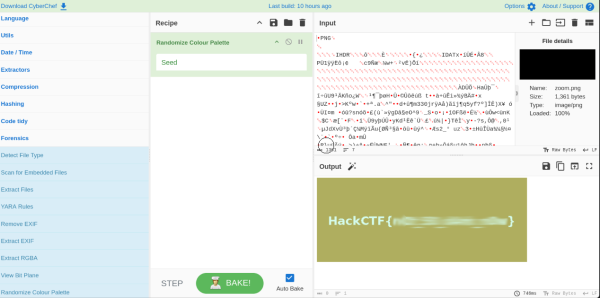
The move here is to apply Randomize Colour Palette to the image. What this does is brilliant in its simplicity: it takes all those near-zero pixel values that were huddled together in the dark, and maps them to completely different, random, vivid colors, making the hidden structure instantly visible.
Step 3 : Let There Be Light
Apply the filter and suddenly, the image isn’t black anymore. Hidden shapes, patterns, or text pop out in a wild splash of random colors.
The data was there the whole time. We just had to change how we looked at it.
See you in next post
#wrapDigital ForensicsCTFsGeneral