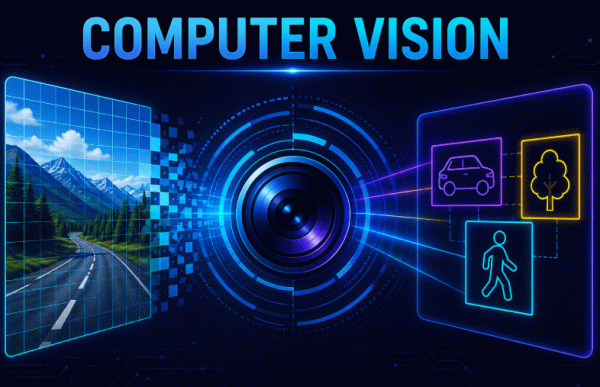
Computers can process millions of images, videos, and camera feeds, but how do they actually understand what they see?
This is where Computer Vision (CV) comes in.
Computer Vision is an important field of Artificial Intelligence that enables computers to understand, interpret, and analyze visual information. It is used in applications ranging from face recognition and object detection to medical imaging, OCR, autonomous systems, and real-time camera applications. The learning material introduces these concepts from the basics and covers both traditional Computer Vision and modern Deep Learning approaches.
What is Computer Vision?
Computer Vision is a field of Artificial Intelligence that enables computers to understand and analyze visual information from the world.
This information can include:
- Images
- Videos
- Real-time camera feeds
- Medical scans
- Satellite images
The overall goal is to enable machines to see and understand visual information in a way that resembles human visual understanding.
How Does Computer Vision Work?
A computer doesn’t look at an image the same way a human does.
Instead, visual information is processed through a series of steps:
Image
↓
Pixels
↓
Features
↓
Patterns
↓
Prediction
↓
Output
This workflow is presented in the learning material as a simple way to understand how visual data becomes a useful prediction.
For example, when analyzing an image of a car, a Computer Vision system may identify features such as:
These features can then help the system recognize the object.
Why Do We Need Computer Vision?
Humans process a huge amount of visual information every day.
We naturally perform tasks such as:
- Recognizing faces
- Reading text
- Identifying objects
- Understanding our surroundings
- Detecting emotions
Computers, however, cannot directly understand an image. Visual information must first be converted into mathematical representations that algorithms can process.
Computer Vision enables machines to:
- Detect objects
- Recognize faces
- Classify images
- Understand scenes
- Analyze videos
- Automatically extract information
How Does a Computer Represent an Image?
Before a computer can analyze an image, it needs to represent that image as numerical data.
Grayscale Images
A grayscale image contains a single channel.
Its representation can be described as:
Height × Width
Each pixel contains information representing the intensity of the image.
Color Images
A color image contains three channels.
Its representation can be described as:
Height × Width × Channels
These channels allow the computer to represent color information in the image.
Understanding image representation is an important first step before learning image processing and Computer Vision algorithms.
Traditional Computer Vision
Before Deep Learning became widely used, Computer Vision systems relied heavily on manually designed features.
The traditional workflow was:
Image
↓
Feature Extraction
↓
Machine Learning Algorithm
↓
Prediction
This meant that humans had to decide which visual characteristics were important for a particular task.
Example: Traditional Face Detection
For face detection, a traditional Computer Vision system might look for features such as:
- Edges
- Corners
- Shapes
- Texture
It could then use higher-level facial features such as:
- Eyes
- Nose
- Mouth
- Face Shape
This approach worked for many applications, but manually designing useful features could become difficult as problems became more complex.
Important Traditional Computer Vision Techniques
The learning material introduces several important techniques used in Computer Vision.
1. Image Processing
Image processing involves modifying images to improve or transform them.
Common examples include:
- Resizing an image
- Removing noise
- Enhancing image quality
- Changing brightness
Image processing is often an important preprocessing step before applying further Computer Vision techniques.
2. Image Filtering
Image filtering modifies pixel values to achieve a particular effect.
One example covered in the material is the Gaussian Filter.
It can be used for:
- Noise reduction
- Smoothing
Filtering can help clean an image and make important visual information easier to process.
3. Feature Extraction
Feature Extraction means finding important information within an image.
For example, when analyzing a car, useful features could include:
These features can then be used by a machine learning algorithm to make predictions.
Deep Learning in Computer Vision
Deep Learning changed the way many Computer Vision systems are developed.
Instead of relying entirely on humans to manually select features, Convolutional Neural Networks (CNNs) can automatically learn useful features from images.
This is one of the major differences between traditional Computer Vision and modern Deep Learning-based Computer Vision.
Traditional Approach
Image
↓
Human-designed Features
↓
Machine Learning
↓
Prediction
Deep Learning Approach
Image
↓
CNN
↓
Automatically Learned Features
↓
Prediction
CNNs therefore play an important role in modern image-based AI systems.
Major Computer Vision Tasks
Computer Vision covers many different types of problems. The Day 17 material highlights several major tasks.
1. Image Classification
Image Classification answers the question:
“What is this image?”
For example, a model could classify an image into a particular category.
The key goal is to assign an image to the appropriate class.
2. Object Detection
Object Detection answers two questions:
What objects exist?
and
Where are they located?
Unlike image classification, object detection can identify multiple objects and their locations within an image.
For example, a street image could contain:
- Cars
- People
- Bicycles
- Traffic signs
An object detection system can identify these objects and determine where they appear.
3. Optical Character Recognition (OCR)
Optical Character Recognition (OCR) converts text contained in images into machine-readable text.
For example, OCR can be used to extract text from:
- Documents
- Scanned pages
- Images
- Signs
The learning material describes OCR simply as converting images into text.
4. Pose Estimation
Pose Estimation detects important points on the human body.
These points can help a computer understand the position and movement of a person.
This can be useful in applications involving human movement and interaction.
5. Image Generation
Computer Vision isn’t limited to analyzing existing images.
AI systems can also be used for Image Generation, where new images are created using AI.
This connects Computer Vision with the broader field of Generative AI.
Computer Vision in Real-World Systems
The material also highlights examples involving technologies such as Tire Police and Humanoid systems.
These examples demonstrate how visual perception can be combined with robotics and intelligent systems.
A humanoid system, for example, can use computer vision to interpret its surroundings and interact with the environment.
Popular Computer Vision Libraries
Learning Computer Vision also means becoming familiar with the tools and frameworks used to build real applications.
The Day 17 material introduces several important libraries and frameworks.
OpenCV
OpenCV is described in the material as a widely used Computer Vision library. It was originally developed by Intel and is now maintained as an open-source project.
OpenCV can be used for:
- Image Processing
- Video Processing
- Object Detection
- Face Detection
- Feature Extraction
- Camera Applications
- Real-Time Computer Vision
For beginners, OpenCV is an excellent starting point for experimenting with images and camera-based applications.
TensorFlow and Keras
TensorFlow/Keras can be used for Deep Learning-based Computer Vision applications.
The material lists applications including:
- CNN Models
- Image Classifiers
- Object Detection Systems
- Transfer Learning Models
This makes TensorFlow and Keras useful when moving from basic image processing to neural-network-based Computer Vision.
PyTorch
PyTorch is a Deep Learning framework developed by Meta AI.
The material highlights its use for:
- AI Research
- Computer Vision Research
- Generative AI
- Advanced Neural Networks
PyTorch is widely useful when experimenting with advanced neural network architectures and research-oriented Computer Vision projects.
PIL/Pillow
Pillow is a lightweight image-processing library and a fork of the Python Imaging Library.
It can be used for:
- Opening images
- Saving images
- Resizing
- Cropping
- Rotating
- Image Enhancement
Pillow is particularly useful when you need simple image manipulation in Python.
OpeVnM
The material also introduces OpenMV, an open-source programmable machine vision camera designed for microcontrollers.
OpenMV allows developers and hobbyists to add Computer Vision and AI capabilities to embedded projects using Python.
Examples mentioned include:
- Facial Recognition
- Object Tracking
- Color Detection
It is designed to work without requiring a full desktop computer or deep knowledge of complex AI frameworks.
Computer Vision vs Traditional Image Processing
It is useful to understand that image processing and Computer Vision are not exactly the same thing.
Image Processing
The primary goal is to modify or improve an image.
Examples:
- Resize
- Crop
- Rotate
- Remove noise
- Adjust brightness
Computer Vision
The goal is to extract meaning or understanding from visual data.
Examples:
- Detect an object
- Recognize a face
- Classify an image
- Extract text
- Estimate human pose
The distinction becomes clearer when we consider the difference between modifying an image and interpreting what’s inside it.
Traditional Computer Vision vs Deep Learning
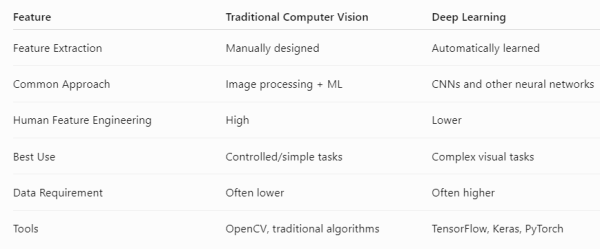
The key distinction emphasized in the material is that traditional Computer Vision relied on manually designed features, while CNNs can automatically learn features.
A Simple Computer Vision Learning Roadmap
If you’re a beginner, you can learn Computer Vision step by step:
Python
↓
Images & Pixels
↓
Image Processing
↓
OpenCV
↓
Feature Extraction
↓
Machine Learning
↓
CNNs
↓
Image Classification
↓
Object Detection
↓
OCR & Pose Estimation
↓
Advanced Computer Vision
This progression helps you understand both the fundamentals and modern Deep Learning approaches.
