Large Language Models (LLMs) can generate impressive answers, but they have an important limitation: they do not automatically have access to every piece of information a user may need.
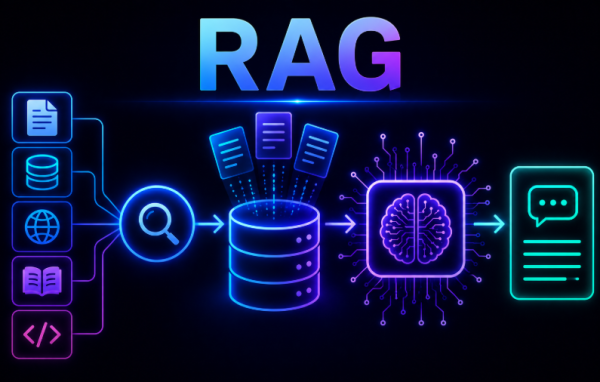
Retrieval-Augmented Generation (RAG) is an AI architecture designed to address this limitation. It combines two key capabilities:
- Information Retrieval — finding relevant information from external sources.
- Large Language Models (LLMs) — generating human-like responses using the retrieved information.
Instead of relying only on information learned during training, RAG allows an LLM to retrieve relevant information from external knowledge sources and use it when generating an answer.
Why Do We Need RAG?
There are several important problems that RAG helps address.
1. Limited Knowledge
LLMs are trained using data available up to a particular point in time. Therefore, they may not know about information that appeared after their training data was collected.
For example, suppose you ask:
“What is the latest security vulnerability discovered in 2026?”
If that vulnerability was not included in the model’s training data, the model may not know about it.
RAG can help by retrieving relevant information from an external knowledge source.
2. Access to Private Data
Organizations often have information that is not publicly available, including:
- Company policies
- Research papers
- Source code
- Customer data
- Internal reports
An LLM does not automatically know this private information.
For example, imagine uploading a company’s employee handbook and asking:
“What is the leave policy?”
A normal LLM cannot automatically know the contents of that private document. RAG can retrieve the relevant section from the document and provide it as context to the LLM.
3. Hallucinations
LLMs can sometimes generate information that sounds convincing but is incorrect.
For example, a user might ask:
“Explain our company’s refund policy.”
The LLM could incorrectly respond that refunds are available for 90 days when the actual policy allows only 30 days.
RAG helps reduce this problem by grounding the response in retrieved documents and information.
How Does RAG Work?
A typical RAG pipeline contains several components that work together.
1. Documents
Documents are the knowledge sources used by the RAG system.
Examples include:
- PDF files
- Websites
- Word documents
- Database records
- Code repositories
- Emails
- Research papers
These sources provide the information that the system can retrieve when answering questions.
2. Document Loader
The document loader reads information from different file formats and data sources.
Examples include:
- PDF loaders for PDF documents
- Web scrapers for websites
- SQL connectors for databases
Popular libraries such as LangChain and LlamaIndex provide document-loading capabilities.
3. Document Preprocessing
Before documents are stored and searched, they may need to be cleaned and normalized.
Common preprocessing tasks include:
- Removing extra spaces
- Removing page numbers
- Removing headers and footers
- Removing HTML tags
- Normalizing text
- Fixing encoding issues
Good preprocessing can make the information easier for the retrieval system to work with.
4. Text Splitting or Chunking
Large documents cannot always be directly passed to an LLM because of context-window limitations.
Therefore, documents are divided into smaller sections called chunks.
For example, a long cybersecurity report might be divided into multiple smaller chunks covering different topics.
These chunks can then be individually converted into embeddings and stored for retrieval.
5. Embeddings
Embeddings are one of the most important components of a RAG system.
An embedding model converts text into numerical vectors. These vectors represent the meaning of the text in a form that can be compared computationally.
For example, two pieces of text with similar meanings should generally have embeddings that are closer together in vector space.
6. Vector Database
After documents are converted into embeddings, the resulting vectors are stored in a vector database.
Unlike traditional SQL databases, vector databases are designed to store and search high-dimensional vectors.
When a user asks a question, the system can search these stored vectors to find information that is semantically relevant to the question.
7. User Query
The process begins when a user asks a question.
For example:
“Explain Prompt Injection.”
This question becomes the input that the RAG system uses to search its knowledge base.
8. Query Embedding
The user’s question is also converted into a vector using the embedding model.
This allows the system to compare the meaning of the user’s question with the embeddings stored in the vector database.
9. Similarity Search
The retriever compares the query vector with the stored vectors.
It searches for chunks whose vectors are closest to the query vector and selects the most relevant information.
For example, a query about prompt injection might retrieve chunks related to:
- Prompt Injection
- LLM Attacks
- Prompt Security
Only the most relevant chunks are selected for the next stage.
Similarity Search Methods
RAG systems can use different methods to determine how similar two vectors are.
Cosine Similarity
Cosine similarity measures the angle between two vectors.
A higher cosine similarity indicates greater semantic similarity.
The formula is:
Similarity = A · B / (A × B)
Euclidean Distance
Euclidean distance measures the physical distance between vectors.
With this method, a smaller distance means greater similarity.
10. Re-Ranking
Sometimes the initial retrieval results are not perfectly ordered.
A RAG system can optionally use another AI model to re-rank the retrieved documents and place the most relevant information first.
This can improve the quality of the context eventually provided to the LLM.
11. Prompt Construction
After relevant chunks are retrieved, they are added to the user’s original question.
For example:
Context:
Prompt Injection is an attack where…
Question:
Explain Prompt Injection.
The combined prompt is then sent to the LLM.
12. Large Language Model
Finally, the LLM receives:
- The user’s question
- The retrieved context
It then generates an answer based on the retrieved information.
This is the key idea behind RAG: retrieve relevant information first, then use that information to generate the response.
Types of RAG
RAG systems can be implemented in different ways depending on the retrieval requirements.
1. Basic or Naïve RAG
The basic RAG workflow consists of six main steps:
- User asks a question.
- The question is converted into an embedding.
- The vector database is searched.
- Relevant chunks are retrieved.
- Retrieved chunks are sent to the LLM.
- The LLM generates the answer.
This is the simplest form of a RAG architecture.
2. Advanced RAG
Advanced RAG improves retrieval quality by adding additional optimization techniques.
These can include:
- Query rewriting
- Metadata filtering
- Re-ranking
- Duplicate removal
- Context compression
These techniques can help the system retrieve more useful and focused information.
3. Hybrid RAG
Hybrid RAG combines vector search with keyword search.
Vector search is useful for finding information with similar meaning, while keyword search is useful for finding exact terms.
Combining both approaches can improve retrieval quality.
Example: CVE Search
Consider a query containing:
CVE-2026-12345
A vector search system may not always understand the importance of the exact CVE identifier.
Keyword search, however, can immediately locate documents containing that exact identifier.
This makes hybrid retrieval particularly useful when working with technical information containing identifiers, names, codes, or exact terminology.
RAG Pipeline at a Glance
A simplified RAG architecture can be understood as:
Documents → Loading → Preprocessing → Chunking → Embeddings → Vector Database
Then, when a user asks a question:
User Query → Query Embedding → Similarity Search → Retrieved Chunks → Prompt Construction → LLM → Answer
This workflow allows the LLM to use relevant external information instead of relying exclusively on its internal knowledge.
Key Benefits of RAG
Based on the architecture described in the Day 20 material, RAG provides several important advantages:
Better access to external information
RAG can retrieve information from documents and other external knowledge sources.
Support for private information
Organizations can use their internal documents and data as knowledge sources.
Reduced hallucination
By grounding responses in retrieved information, RAG can help reduce incorrect responses.
More relevant answers
Similarity search allows the system to retrieve information related to the user’s specific question.
Flexible knowledge sources
RAG can work with sources such as PDFs, websites, databases, code repositories, emails, and research papers.
Conclusion
Retrieval-Augmented Generation (RAG) connects information retrieval with large language models.
Instead of asking an LLM to answer a question using only its existing knowledge, a RAG system first searches relevant external information, retrieves useful chunks, adds them to the prompt, and then allows the LLM to generate an answer based on that context.
The basic RAG pipeline includes document processing, chunking, embeddings, vector storage, query embedding, similarity search, prompt construction, and LLM generation.
More advanced implementations can introduce techniques such as query rewriting, metadata filtering, re-ranking, duplicate removal, context compression, and hybrid search.
For modern AI applications, RAG provides a practical architecture for connecting LLMs with external and private knowledge sources while helping produce more grounded responses.
