![Placeholder third-party[.]com Referenced Across 1,700+ Repositories Now Serves Malicious Content](/news/uploads/img_6ab5c965aa6391.32342778.webp)
Fake Placeholder Domain Third-Party.com Used to Deliver ClickFix Malware
A domain commonly used as a documentation placeholder, third-party[.]com, has been observed serving a ClickFix social engineering attack to Windows users while showing harmless or different content to other visitors.
The domain had been widely used in documentation, testing, and AI-related projects as an example endpoint. However, unlike example[.]com, the domain is not reserved by IANA, meaning it could be registered by anyone.
Security researchers at Manifold Security found that the domain has been serving a ClickFix lure since at least June 2026.
How the ClickFix Attack Works
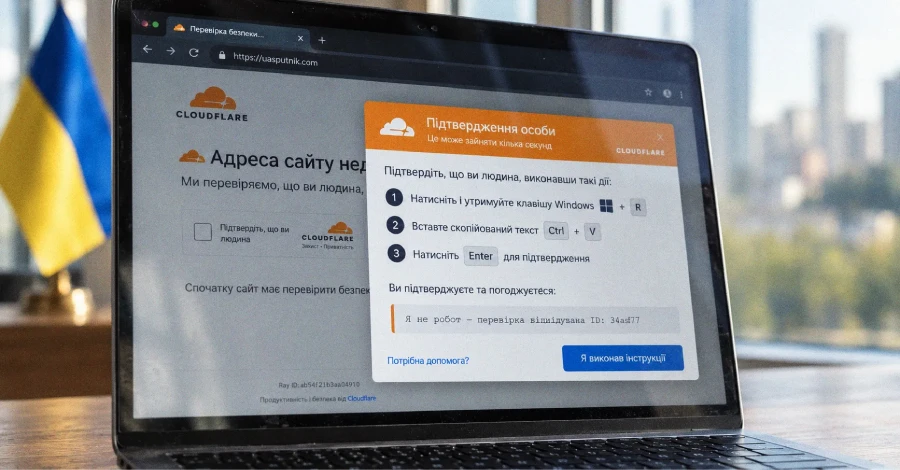
Windows users visiting the malicious domain are shown a fake Cloudflare security verification page.
The page attempts to poison the clipboard with a malicious command and instructs the victim to paste and execute it through the Windows Run dialog.
The command is designed to download and execute a remote PowerShell payload.
ClickFix attacks commonly use fake CAPTCHA, browser error, or security verification messages to convince victims that they need to copy and run a command to resolve a problem.
The technique can also be considered a form of pastejacking, where attackers manipulate the clipboard so that a malicious command is pasted instead of the text the victim expects.
Different Content for Windows and macOS
The malicious website changes its behavior depending on the visitor.
Windows users receive the fake Cloudflare verification and malicious clipboard payload.
macOS users instead receive an error message claiming that the website requires a Windows computer.
This type of conditional content makes the malicious behavior harder to identify through automated analysis.
Domain Used Across Thousands of GitHub Projects
A GitHub search found more than 1,700 public repositories referencing third-party[.]com.
Many of these references are legitimate documentation examples, including projects related to AI agent skills and MCP server documentation.
Because the domain was widely treated as a harmless placeholder, developers and automated systems may follow the link without realizing that its ownership and content can change.
This creates a potential supply-chain and prompt-injection risk for AI agents that process documentation or execute instructions from external resources.
Other Placeholder Domains Also Serving Scams
Manifold Security said it identified 13 additional placeholder-style domains that are not reserved by IANA.
Two of them, yoursite[.]com and your-domain[.]com, were observed serving scams and scareware to macOS users while showing ordinary domain-parking pages to other visitors.
Reported examples included:
- Fake macOS security warnings claiming the device was infected
- Fake antivirus renewal offers
- Fake news articles promoting investment schemes
The identified domains include:
your-domain[.]comyourdomain[.]comyour-site[.]comyoursite[.]comyour-app[.]comyourapp[.]commyapp[.]commysite[.]comacme[.]comcompany[.]commycompany[.]comvendor[.]comfoo[.]com
Some of these domains reportedly appear in hundreds of thousands of GitHub files and numerous AI agent skills.
Why Placeholder Domains Are a Security Risk
Developers frequently use realistic-looking domains such as yourcompany[.]com, mycompany[.]com, or your-api[.]com in documentation and test code.
If those domains are not reserved or controlled by the organization, an attacker can register them and later serve malicious content.
This is particularly concerning for AI agents that automatically read documentation, resolve URLs, retrieve external resources, or follow instructions from online content.
A static security scan of a repository may show nothing suspicious because the malicious behavior only appears when the domain is actually accessed.
Recommended Mitigations
Developers should:
- Audit documentation and code for placeholder domains.
- Avoid using realistic domains that are not under their control.
- Use officially reserved domains such as
example[.]com,example[.]org, andexample[.]net. - Review AI agent skills and MCP documentation for external URLs.
- Treat external domains as potentially changeable resources.
- Monitor unexpected domain changes and redirects.
- Avoid blindly trusting commands displayed by websites.
Key Takeaway
The abuse of third-party[.]com shows how a harmless-looking placeholder can become an attack delivery mechanism when its domain is not officially reserved.
Developers should use IANA-reserved example domains for documentation and testing instead of realistic domains that attackers can register and weaponize. For AI agents in particular, external URLs should be treated as untrusted input because their content can change after the original code or documentation was published.