Malicious Ethersphere Releases Steal Cryptocurrency Wallet Keys and Install Backdoors Across Windows, Linux and macOS
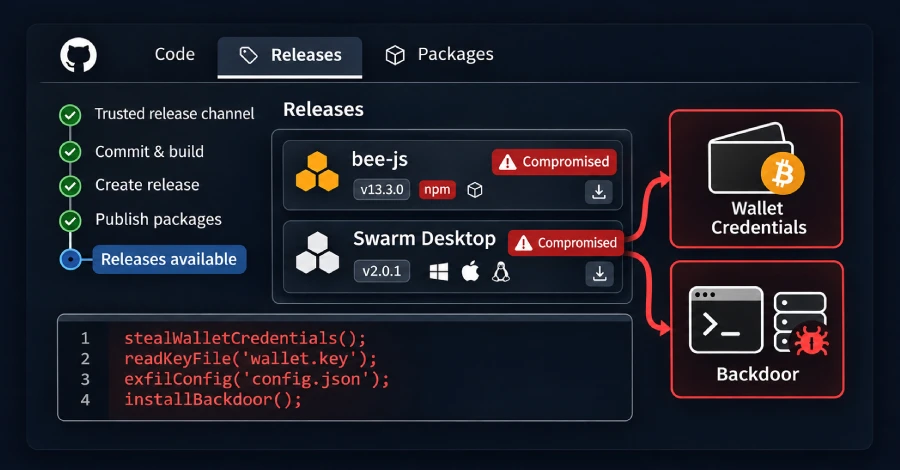
Cybersecurity researchers have uncovered a software supply chain attack targeting the Ethersphere project's tools for the Swarm decentralized storage network. Attackers abused the project's own release automation to publish malicious versions of two widely used components, bee-js 13.3.0 and Swarm Desktop 0.56.2.
The compromised releases were designed to steal cryptocurrency wallet keys and passwords stored by Swarm Desktop while installing persistent backdoors on Windows, macOS and Linux systems.
According to investigations by Socket and SafeDep, the malicious code could access the encrypted Ethereum keystore and the password required to unlock it. This potentially exposed users' xDAI and xBZZ tokens, chequebook funds and network stake.
Both malicious releases have been withdrawn, and Ethersphere maintainers have published clean replacements. However, removing the malicious versions does not automatically remove an installed backdoor or protect credentials that may already have been stolen.
No cryptocurrency fund theft had been reported at the time of the investigation.
Malicious Packages Distributed Through Official Releases
The attackers compromised Ethersphere's release automation account, known as bee-worker, and used it to publish malicious software through legitimate project channels.
The two affected releases were:
- bee-js 13.3.0: A JavaScript library used by Swarm Desktop and the
swarm-clicommand-line tool. - Swarm Desktop 0.56.2: A desktop application that runs a Swarm node locally and stores its private keys on the user's computer.
The malicious bee-js version was available on npm for approximately 75 minutes, from 00:09 to 01:25 UTC. Its postinstall script automatically executed during package installation unless installation scripts were disabled. Projects did not need to import the library for the malicious code to run.
Swarm Desktop 0.56.2 appeared on GitHub at approximately 00:36 UTC and was withdrawn around 8.5 hours later. Its built-in updater could offer the compromised release to Windows x64 systems and Apple Silicon Macs within approximately 10 minutes. Intel Macs were not offered the update, while Linux installations did not update automatically.
The affected version ranges were also accepted by the project's swarm-cli and bee-dashboard packages, meaning fresh installations during the exposure window could have downloaded the compromised dependency.
Socket estimated that bee-js 13.3.0 was downloaded approximately 10 times, including by security scanners and mirrors. Swarm Desktop 0.56.2 had reached 65 downloads by 08:27 UTC, including researcher downloads.
How the Malware Steals Cryptocurrency Wallet Credentials
Both compromised releases contained the same malicious loader, according to SafeDep's technical analysis.
The loader downloads additional code from:
api.frameworkmetrics[.]xyz
It then executes the downloaded payload with the permissions of the current user.
In bee-js, the malicious loader runs through the npm postinstall script. In Swarm Desktop, it executes whenever the application starts.
The downloaded malware searches the Swarm Desktop data directory for two important files:
config.yamldata-dir/keys/swarm.key
If both files are present, the malware sends them to an attacker-controlled server.
The swarm.key file contains an encrypted Ethereum keystore, while Swarm Desktop stores the password needed to unlock it in plain text inside config.yaml.
With access to both files, attackers could potentially unlock the node's wallet and access its xDAI and xBZZ tokens, chequebook funds and stake.
Persistent Backdoors Installed on Multiple Operating Systems
Beyond cryptocurrency credential theft, the malicious releases also deploy remote-access capabilities that allow attackers to maintain access to compromised systems.
The malware uses different mechanisms depending on the operating system.
Linux and macOS
On Linux and macOS, the malware installs a Go-based remote shell called evjawbreaker. It is stored in a hidden directory:
~/.solidity
Persistence is established through operating system services:
- Linux:
solidity-langsupport-runner.service - macOS:
com.solidity.langsupport.runnerLaunchAgent
The remote shell retrieves its command-and-control server address from an Ethereum smart contract. This allows attackers to change the server address without modifying the installed malware.
Researchers noted that the attackers had updated the address approximately 29 minutes before the malicious bee-js package was published.
Windows
On Windows systems, the malware installs a legitimate ScreenConnect remote-access client signed by its developer, ConnectWise.
The client runs as a system service and connects to an attacker-controlled relay server.
If the victim has administrator privileges, the malware uses a known technique to bypass the User Account Control prompt. If the user is not an administrator, the prompt is displayed again whenever the user cancels it.
After obtaining the required privileges, the malware adds an exclusion to Microsoft Defender and silently installs the remote-access client.
How Attackers Abused Ethersphere's Release Automation
The malicious releases were published through Ethersphere's own release automation infrastructure rather than through conventional malicious package submissions.
Investigators found that both releases originated from the project's bee-worker account. The changes were neither signed nor submitted through pull requests.
For bee-js, attackers created a GitHub release for version 13.3.0, which automatically triggered the project's npm publishing workflow. The workflow required no approval and published the malicious package within approximately 73 seconds.
Although the package carried valid provenance information, this did not guarantee that its code had been reviewed. Provenance establishes the relationship between a package, its repository and the workflow that built it. It does not prove that the published code is safe.
For Swarm Desktop, attackers manually triggered a build workflow that had access to the project's Apple and Windows signing certificates. The workflow also required no approval.
The macOS application was signed using the project's Developer ID certificate and notarized by Apple, allowing it to pass through the normal first-launch security process.
Following the incident, maintainers changed the release process so that application signing jobs require approval from the project's DevOps team and can run only from the main branch.
The exact method used to steal the CI credentials and secrets had not been established in the available incident reports. Investigators identified activity involving two GitHub accounts: bee-worker and a long-time maintainer's account.
Clean Updates Released, but Infected Systems Remain at Risk
Ethersphere withdrew Swarm Desktop 0.56.2 and published version 0.56.3 as a clean replacement.
According to the maintainers, version 0.56.3 contains the same application code as the previously clean version 0.56.1, but it is signed with a newly issued Developer ID certificate.
The application's automatic updater can move installations of 0.56.2 to the clean release. Linux users must manually replace their packages.
The malicious bee-js 13.3.0 release was also removed from npm, with version 13.2.0 again listed as the latest available version when researchers checked.
However, updating or uninstalling the affected software does not remove malware that has already been installed.
The GitHub advisory for bee-js 13.3.0 warns that any computer where the package was installed or executed should be considered fully compromised.
Security Recommendations for Developers and Swarm Desktop Users
Organizations and developers should investigate whether affected versions were installed, including through indirect dependencies and automated build systems.
If you use bee-js:
- Search package lockfiles, package caches, internal registries and CI installation logs for
@ethersphere/[email protected]. - Check whether other dependencies pulled in the compromised version.
- Pin the dependency to version 13.2.0.
- Clear cached copies of version 13.3.0 from npm mirrors and internal registries.
- Treat machines and CI runners that installed the malicious package with scripts enabled as compromised.
- From a clean computer, rotate all passwords, tokens and keys accessible to the affected user or CI environment.
If you use Swarm Desktop:
- Check the application log for the entry
Bee Desktop version: 0.56.2 (production). - Install clean version 0.56.3. Linux users must replace their packages manually.
- If version 0.56.2 ever ran, assume the node's private key and password have been stolen.
- From a clean computer, move node funds, chequebook funds and stake to a newly generated key.
The application log locations are:
- macOS:
~/Library/Logs/Swarm Desktop/ - Windows:
%LOCALAPPDATA%\Swarm Desktop\Log\ - Linux:
~/.local/state/Swarm Desktop/
On any system where the malicious code executed:
- Remove the
~/.solidity/directory. - Check for
solidity-langsupport-runner.serviceon Linux. - Check for
com.solidity.langsupport.runneron macOS. - Check for
ScreenConnect Client (5cbe79c9c25524df)on Windows. - Do not assume that updating, reinstalling or uninstalling the application removes these components.
- Where possible, rebuild compromised systems from a trusted image instead of attempting to clean them in place.
Indicators of Compromise
Security teams can use the following indicators to investigate potentially affected systems:
IndicatorValueMalicious domainapi.frameworkmetrics[.]xyzURL path/v1/analyticsURL path/v1/electronURL path/v1/assets/URL path/v1/swarm/reportHTTP headerX-Ethersphere: 1Linux/macOS C2193[.]57[.]9[.]155:4912Windows relay185[.]232[.]84[.]169:8041Ethereum contract0xf8a900Db50b3331be6B768bA460BB59f3E40C344Malware directory~/.solidity/Linux servicesolidity-langsupport-runner.servicemacOS LaunchAgentcom.solidity.langsupport.runnerWindows serviceScreenConnect Client (5cbe79c9c25524df)
Possible Connection to Earlier SleepyDuck Malware Activity
Researchers identified similarities between the payloads used in the Ethersphere compromise and malware associated with malicious Solidity developer extensions previously distributed through the Open VSX marketplace.
The similarities include a shared Ethereum smart contract, ScreenConnect relay infrastructure and filenames using misleading extensions.
Pluto Security previously documented these malicious extensions in an investigation known as EtherDuck. Researchers linked them with high confidence to the group behind the original SleepyDuck extension, which used a different Ethereum smart contract to retrieve its command-and-control server address in 2025.
Socket assessed that the same group was responsible for the malicious bee-js and Swarm Desktop releases.
A Warning About Software Supply Chain Security
The Ethersphere incident demonstrates how attackers can compromise trusted software distribution channels and use legitimate release infrastructure to deliver malware.
Even signed and notarized applications, along with packages carrying valid provenance information, can contain malicious code when the underlying build and publishing workflows are compromised.
Organizations should enforce approval requirements for release workflows, protect CI/CD credentials, review dependency changes and monitor package installations for unexpected postinstall behavior.
For developers and Swarm users, the most important step is to determine whether either compromised release ever executed on their systems. Installing the clean update alone is not sufficient to guarantee that an already compromised machine or cryptocurrency wallet is safe.